


Insights / Hardware & Electronics
Smart Home IoT Devices: Hardware Components and Architecture
The six hardware blocks inside every smart home device, and the decisions that set battery life, offline behaviour, security and unit cost.


The short answer
A smart home IoT device is built from six hardware components: sensors that measure the room, actuators that change something physical, a microcontroller that decides locally, a radio module that connects it, a power system, and the firmware, PCB and enclosure that hold it together. These choices decide whether the device still works in year three: its battery life, how it behaves offline, what it costs to build and what it takes to certify. Devices that run AI on board add one more budget: compute and memory headroom for the model. This guide is for hardware, firmware and product leads at teams shipping smart home devices at volume.
Key takeaways
- Choose the radio early. It is the hardware decision that is hardest to reverse after launch.
- Keep the core function local. A thermostat or lock must keep working when Wi-Fi or the cloud is down.
- Budget power from measured duty cycles, not datasheet sleep current.
- Device identity, signed updates and fail-safe states are hardware decisions made before code review.
- If the device will run AI, size the processor, memory and power for the model you will ship in year three, not only the firmware you ship on day one.
Why hardware decides whether a smart home product survives
A common pattern: a team ships a polished app, then finds during the pilot that a sensor drifts, the battery drains twice as fast as planned, or the enclosure cannot survive the install location. These failures sit in the hardware. App updates cannot fix them.
Most stalled smart home programmes trace back to one hardware decision taken too early, before anyone planned manufacturing, certification or the real home the device will live in. That matters most to teams shipping devices at volume: appliance and HVAC makers, utilities, insurers and property developers, as well as consumer brands.
How does a smart home device work?
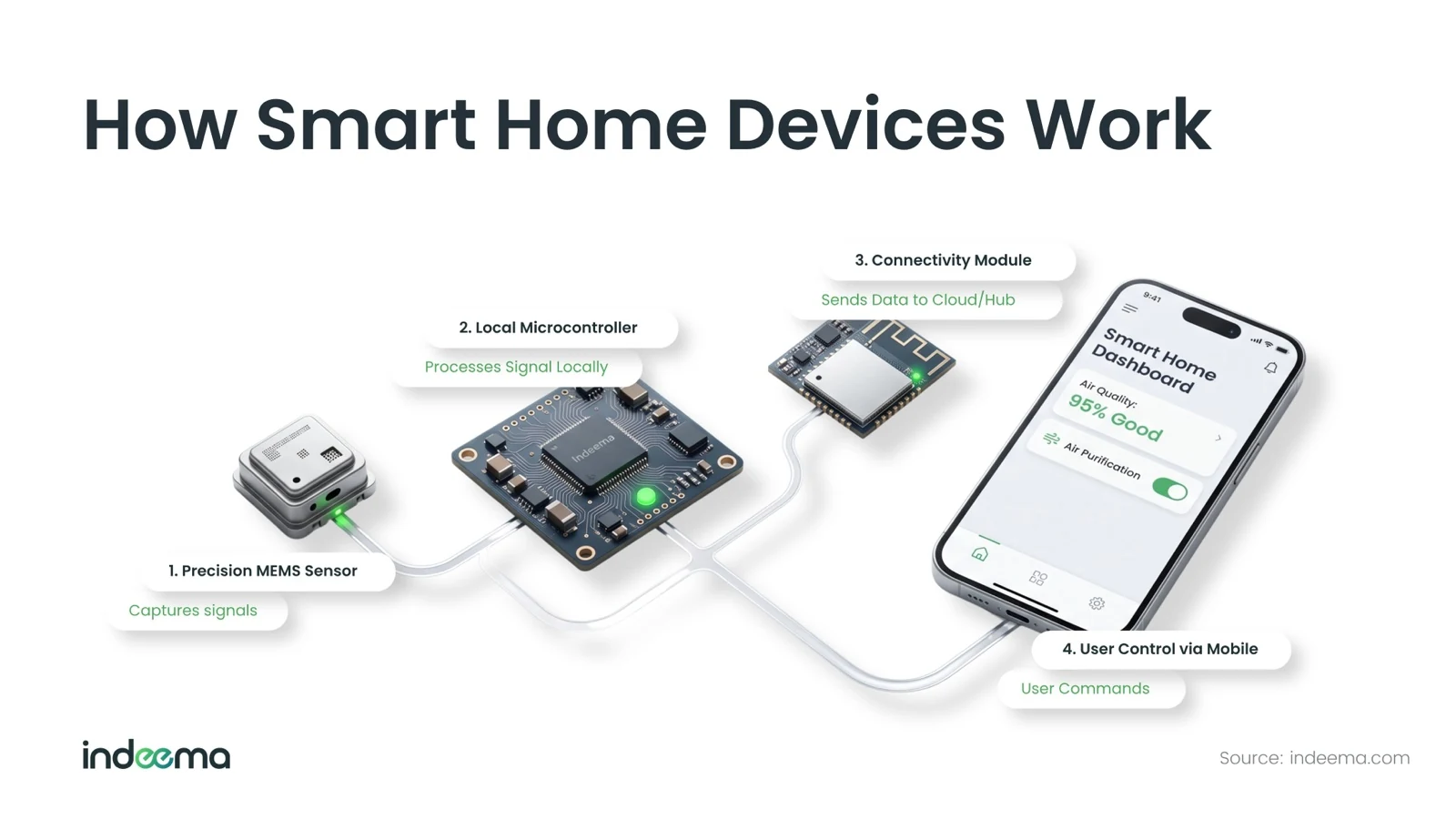
The signal path repeats across almost every device:
- SenseA sensor turns a condition in the room (motion, temperature, a leak) into a signal.
- Decide locallyThe microcontroller filters the signal and decides whether anything should happen.
- ActAn actuator switches power, moves a motor or closes a valve.
- ConnectThe radio reports state to a hub, the cloud or a phone.
- ControlThe person sees the state and changes settings in the app or by voice.
The sense → decide → act loop must keep working when the connection is gone; the app and cloud are a convenience layered on top.
"Smart" does not have to mean "cloud-dependent". Products that hold up in the field keep the cloud optional. A thermostat that loses Wi-Fi should still hold temperature, and a lock that loses signal should still open with a PIN.
- Local-first device
- A device whose primary function runs on its own controller and stays available without internet access. The cloud adds remote access, history and fleet-wide updates.
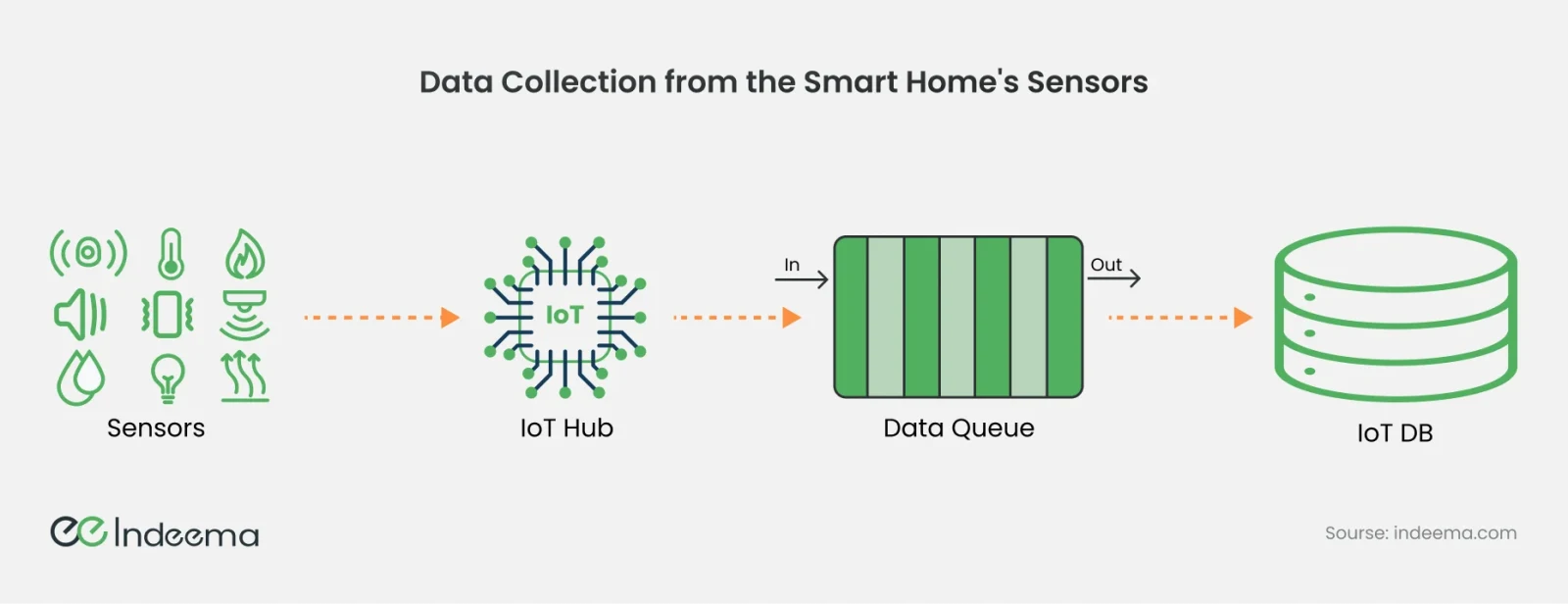
Data that does leave the device usually travels through a hub or gateway and is queued before it is stored, so a burst of readings or a short outage does not lose data.
What hardware components are inside a smart home device?
Every smart home device combines six blocks: sensors, actuators, a microcontroller or processor, a connectivity module, a power supply, and the firmware, memory, PCB and enclosure that turn them into a product.
1. Sensors: how the device perceives the home
Motion, temperature and humidity, light, leak and air-quality sensors are the most common. Choosing one is a specification decision. Sampling rate, accuracy over time and power draw decide whether the architecture works, not just whether the part can measure the quantity.
| Sensor | Typical job | Power profile | What to check before you commit |
|---|---|---|---|
| Motion (PIR) | Occupancy, security, lighting triggers | Very low; wakes the MCU on an event | False triggers from pets and heat sources; lens and mounting angle |
| Temperature / humidity | HVAC and comfort control | Low; periodic sampling | Self-heating from nearby electronics; placement inside the enclosure |
| Water leak | Damage prevention | Near zero until wet | Probe material, alarm path when the radio is offline |
| Air quality (CO₂, VOC, particulates) | Ventilation and health | Higher; some sensors need warm-up or a fan | Calibration drift over months; whether a battery budget is realistic |
| Light | Daylight-aware lighting | Very low | Field of view and response range |
2. Actuators: turning commands into physical action
Relays and switches behind smart plugs, motors behind blinds and curtains, valve actuators for water and irrigation, solenoids inside locks. This is where "it worked in the demo" becomes "it failed in the field". A relay rated for indoor duty cycles will not survive a garage door opener cycling twenty times a day in a humid climate. Size the actuator for the real duty cycle and environment, and decide what position it should fail into.
For the actuator types and how they close the loop with sensors, see sensors and actuators in IoT.
3. Microcontroller or processor: where decisions run
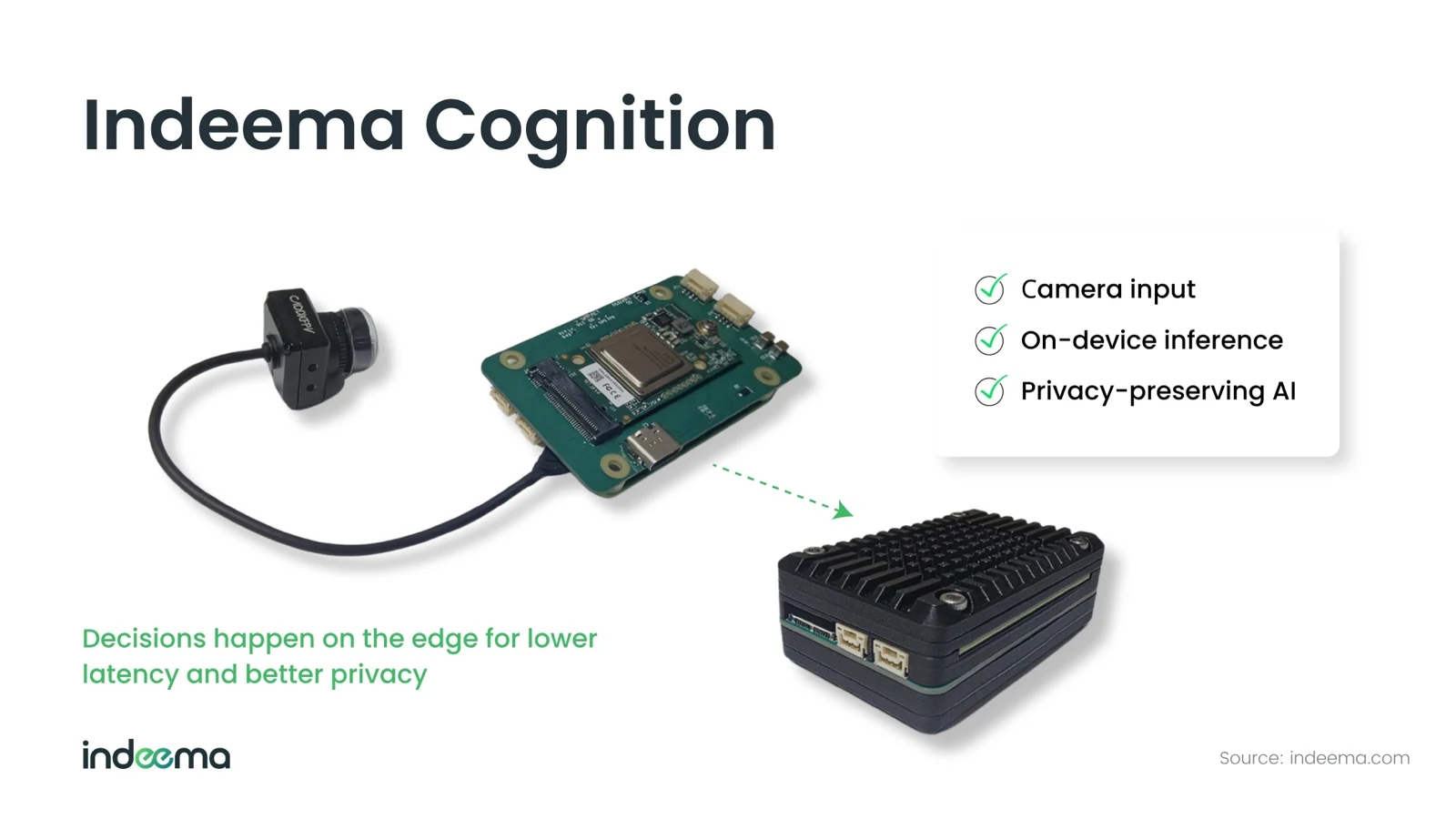
A microcontroller (MCU) or system-on-chip (SoC) turns raw readings into a decision: is this motion or noise, is the room warm enough? Simple sensors and switches need only a low-power MCU. Cameras and voice devices increasingly run inference on the device itself, because latency and privacy matter there. That needs a more capable processor and a thermal design to match.
4. Connectivity module: how the device communicates
Wi-Fi, Bluetooth LE, Zigbee, Z-Wave, Thread or cellular, chosen against range, power budget, bandwidth and whether the device must join a mesh. The comparison follows below.
5. Power supply and battery management
A battery-powered motion sensor is expected to run a year or more on a small cell. A mains-powered thermostat has a different power envelope entirely. Get this wrong and either the device needs battery changes so often it stops feeling smart, or its own consumption undermines the energy it is meant to save. See power supplies for IoT devices for the battery and supply options.
6. Firmware, memory, PCB and enclosure
Firmware turns the parts above into a product. It reads sensors, drives actuators, manages the radio and installs updates safely. PCB layout and enclosure design decide whether the device is manufacturable, how well its antenna performs and whether it passes certification. That is the difference between a board that works once on a bench and a product that ships in volume.
Which connectivity should a smart home device use: Wi-Fi, Bluetooth LE, Zigbee, Z-Wave, Thread or Matter?
The connectivity protocol is one of the few smart home decisions that is genuinely hard to reverse after launch. Change it later and you are redesigning radio hardware and recertifying, not patching firmware.
| Option | Best for | Power cost | Topology | Needs a hub? |
|---|---|---|---|---|
| Wi-Fi | Cameras, doorbells, displays: anything moving real bandwidth | High | Star, via the home router | No |
| Bluetooth LE | Locks, wearables, phone-first set-up and control | Low | Point-to-point (mesh optional) | No for phone control; yes for remote access |
| Zigbee / Z-Wave | Battery sensors and switches in a home mesh | Low | Mesh; mains devices extend range | Yes |
| Thread | Low-power IP mesh; the base for Matter devices | Low | IP mesh | Yes, a border router |
| Cellular (LTE-M / NB-IoT) | Devices that cannot rely on home Wi-Fi | Medium; plan for a data contract | Direct to the network | No |
Matter is not a radio. It is an application-layer standard that runs over Wi-Fi, Thread and Ethernet and uses Bluetooth LE for commissioning. It aims to let customers choose a product without first choosing an ecosystem. Certification shapes parts of your firmware and provisioning flow, and retail channels increasingly expect it.
Hubs, gateways and local control
A hub bridges protocols that the internet does not speak natively (Zigbee, Z-Wave, Thread) to apps, cloud platforms and voice assistants. It is often where local automation runs, so a scene still fires when the internet drops. A gateway applies the same idea at scale: it aggregates many devices, normalises their data and forwards it to a cloud platform.
- Wi-Fi and Bluetooth LE devices can talk directly to a phone or the internet.
- Zigbee, Z-Wave and Thread devices need a hub, or a border router in Thread's case.
- Keep decisions local and use the cloud for what it is good at: analytics, remote access and fleet-wide updates.
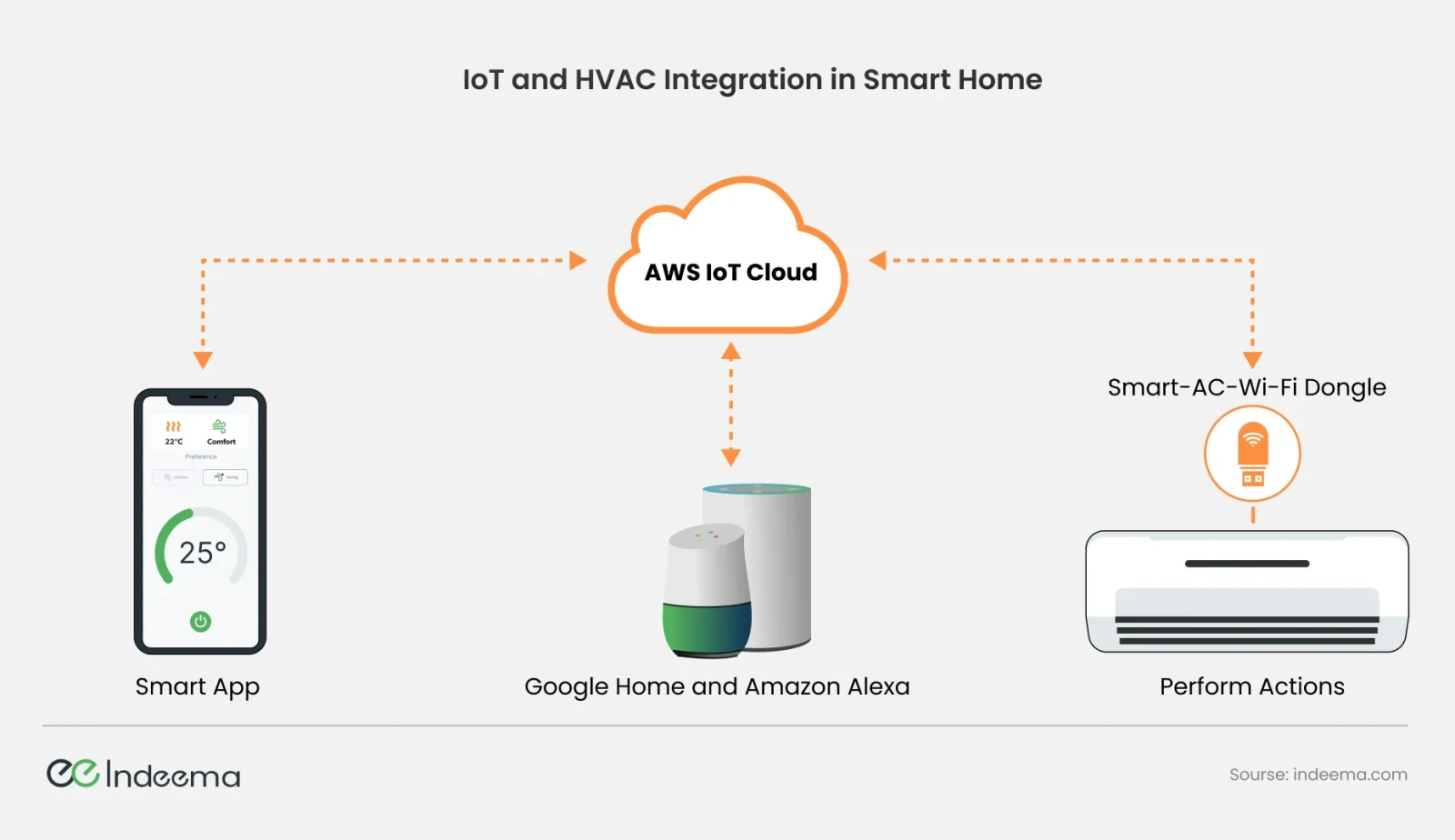
Connected HVAC shows the pattern. The thermostat, app and voice assistant meet in a cloud service, and a small connected module on the air conditioner carries out the command.
How the blocks combine in common device types
Product roadmaps are built from a handful of device categories. Each is a different combination of the same blocks, tuned for one job.
| Device type | Sensing | Acting | Usual radio | Power |
|---|---|---|---|---|
| Sensors (motion, climate, leak, air) | One or more sensors | None, or a buzzer | Zigbee, Thread or BLE | Battery, for years |
| Lighting, switches and plugs | Current or light sensing | Relay or dimmer | Zigbee, Thread or Wi-Fi | Mains |
| Thermostats and connected HVAC | Temperature, humidity, occupancy | Relays or a connected module on the unit | Wi-Fi, Thread | Mains or low-voltage HVAC wiring |
| Locks | Position, tamper, credentials | Motor or solenoid | BLE plus Thread or Wi-Fi | Battery, with low-battery fallback |
| Cameras and video doorbells | Image sensor, motion, audio | Chime, light | Wi-Fi | Mains or large battery |
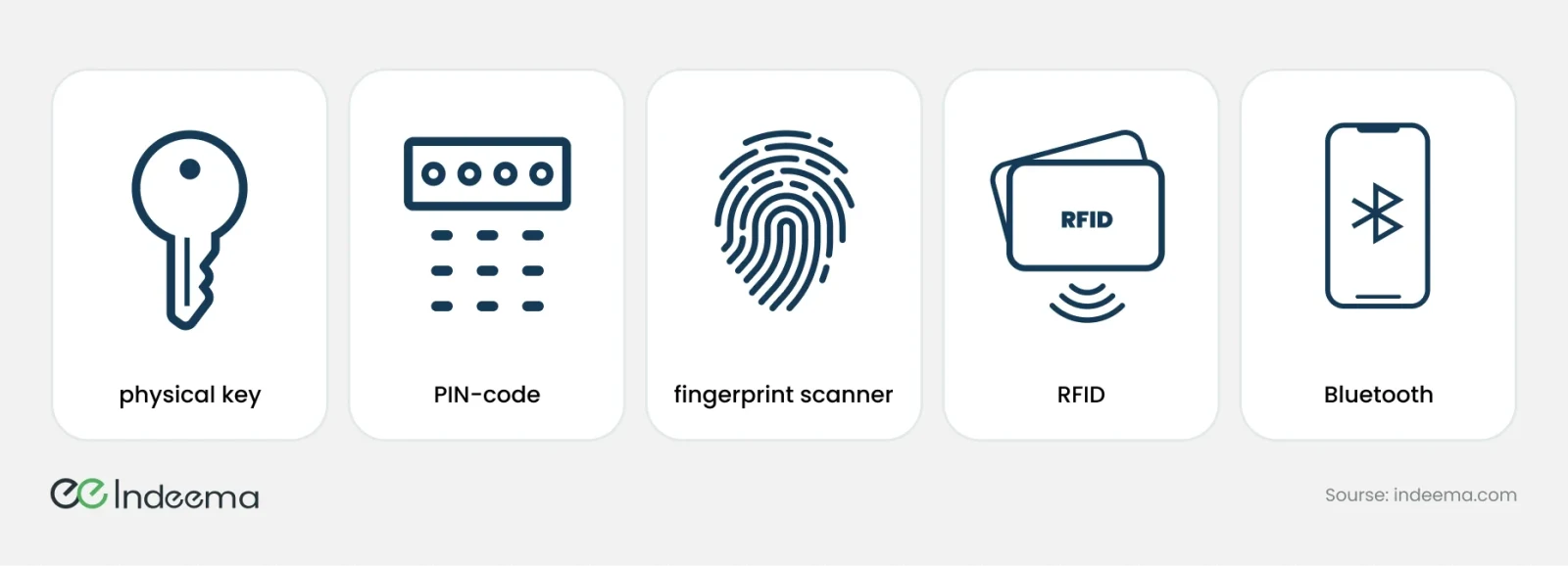
Locks have the least tolerance for failure, so they combine several ways in: a physical key, a PIN, a fingerprint, an RFID card or a phone over Bluetooth. If one path fails, the door still opens for the right person.
What hardware does on-device AI need?
More smart home devices now decide with a model rather than a threshold: a camera that tells a person from a pet, a sensor that recognises a running tap or a fall from vibration or sound, a thermostat that learns when rooms are used. Running that inference on the device keeps it fast, private and working offline. It also changes the hardware brief.
| Block | Without AI | With on-device AI |
|---|---|---|
| Processor | A low-power MCU running control logic | An MCU with DSP extensions or a neural accelerator, or an SoC with an NPU for vision and voice |
| Memory | Firmware and configuration | Room for model weights and working memory, plus a second image slot so a model update can roll back |
| Sensors | Accurate enough for a threshold | Consistent enough between units that one model works across the whole production run |
| Power | Duty cycle set by sampling and radio | Inference adds to the duty cycle; a cheap trigger that wakes the model only when something happens protects battery life |
| Firmware | Updates fix faults and add features | Over-the-air updates also replace models, with versioning, rollback and monitoring of how they behave in the field |
Small models on microcontrollers, often called TinyML, handle keyword spotting, vibration and sound classification and simple presence detection. Vision and natural-language features usually need an SoC or a hub, or a split where the device detects an event and the hub or cloud does the heavier analysis. Model design moves that line too: our CTO's peer-reviewed work on speech separation built to run at the edge shows how far a voice model can be reshaped to fit the device instead of the cloud. Where inference belongs in the wider system, device, gateway or cloud, is covered in edge computing and IoT.
For a device maker, the AI feature is only as good as the board under it. We size processors, memory and power for the models a product will need, alongside the firmware that ships them; see AI for IoT and edge AI.
Security starts in the hardware
Security is often treated as a software problem to be solved with encryption after the hardware is finished. The decisions that matter most are made earlier: where keys are stored, and whether a device fails open or closed.
- Device identity: each unit needs a verifiable identity, usually provisioned at manufacturing, so the platform can trust that a command came from where it claims. Weak authentication is how one compromised plug becomes a foothold in a home network.
- Encrypted communication and signed updates: traffic between device, hub and cloud is encrypted, and firmware updates are cryptographically signed and verified before they install.
- Offline mode and backup power: locks and alarm panels need a defined behaviour during power or network loss, and alerts that still reach a phone during a partial outage.
- Privacy: cameras, locks, speakers and even motion sensors reveal presence and habits. Data minimisation and a clear retention policy are product requirements.
Engineering trade-offs
Wi-Fi radio vs a low-power mesh radio
- You gain
- Wi-Fi needs no hub and carries bandwidth for video and rich data.
- You pay
- Wi-Fi drains batteries quickly and depends on the customer's router; mesh radios need a hub or border router.
- Choose it when
- Wi-Fi for mains-powered, high-bandwidth devices; Thread or Zigbee for battery sensors that must last years.
Local decisions vs cloud decisions
- You gain
- Local logic keeps working offline, responds faster and keeps personal data in the home.
- You pay
- It needs a more capable controller and careful firmware for updates and state sync.
- Choose it when
- Run the core function locally; use the cloud for history, remote access and fleet updates.
Certified module vs custom board
- You gain
- A pre-certified module shortens radio certification and de-risks RF design.
- You pay
- It fixes the form factor, BOM cost and power envelope you can reach.
- Choose it when
- Use a module until form factor, power budget, sensor combination or unit cost genuinely requires a custom design.
Microcontroller with TinyML vs SoC with an NPU
- You gain
- A microcontroller keeps unit cost, power draw and certification simple, and is enough for sound, vibration and presence models.
- You pay
- It cannot run vision or language models, and memory limits how far the model can grow.
- Choose it when
- Use a microcontroller for event detection on battery devices; choose an SoC with an NPU when the product roadmap includes vision or voice on the device.
Decision matrix: four common device archetypes
Start from the device's job and power source; the controller, radio and where decisions run follow from them.
| Device | Controller | Radio | Power | Where decisions run |
|---|---|---|---|---|
| Battery sensor (leak, motion, climate) | Low-power MCU with deep sleep | Thread or Zigbee | Coin or AA cell, years of life | On the device; the hub handles automations |
| Mains switch, plug or thermostat | MCU, or a radio SoC with spare capacity | Thread, Zigbee or Wi-Fi | Mains | On the device; cloud for schedules and remote access |
| Camera or video doorbell | SoC with video encoding, often edge inference | Wi-Fi | Mains or large rechargeable battery | Detection on the device; recordings by policy |
| Smart lock | Low-power MCU plus a secure element | BLE for the phone, plus Thread or Wi-Fi via a hub | Battery with a defined low-battery fallback | Always on the device; it must open offline |
Decision rule: Fix the power source and the offline behaviour first; choose the radio second; size the controller last, for the work it must do locally.
Before you commit to a bill of materials
A short review that turns a concept into hardware requirements:
- Write a one-page device brief: who uses it, where it sits, what decision follows a reading, and what must still work offline.
- List every interface (sensor, actuator, radio, power, app) with sender, receiver, expected data and failure response.
- Set the battery life target from a measured duty cycle, not datasheet sleep current.
- Decide your position on Matter and Thread before the radio is fixed in hardware.
- Plan device identity and signed firmware updates now; they shape the manufacturing flow.
- Check whether a certified module covers form factor, power, sensors and certification. Design a custom board only where it does not.
- If the device will run AI, decide which models run on board and reserve compute, memory and an update path for them.
Common mistakes
Shipping the prototype board
Development boards and hobby modules rarely meet power, size, cost or certification needs at volume.
Instead: Treat the prototype as a way to prove the behaviour, then design for production.
Making the core function depend on the cloud
An outage turns a lock or thermostat into a support ticket.
Instead: Keep sensing, deciding and acting on the device or hub; let the cloud enhance, not enable.
Choosing the radio last
Antenna placement, enclosure and certification are already fixed around the wrong part.
Instead: Choose the radio alongside the enclosure and power design.
Budgeting power from the datasheet
Real wake-ups, retries and radio join time drain the battery far faster than plan.
Instead: Measure the duty cycle on a prototype and add margin.
Adding security after the hardware
Without a secure place for keys or a signed boot path, later fixes are limited.
Instead: Specify identity, key storage and update signing with the hardware.
Sizing the processor for today's firmware only
The first AI feature does not fit, and adding it means a new board and new certification.
Instead: Budget compute, memory and a second image slot for models before the bill of materials is fixed.
Where we've built this
The same sensor-versus-power trade-off shaped an indoor air-quality monitor we built. The work covered hardware architecture validation, sensor integration, smart home protocol support and the connected mobile and cloud platforms.
Case studyBuilding an indoor air monitor and companion app across two device generationsAn indoor air-quality monitor and companion app, where sensor fidelity had to be balanced against a power draw low enough to run unobtrusively at home.Questions engineers ask
What is needed in a smart home to connect sensors and smart devices to a network?
Each device needs a radio. Wi-Fi and Bluetooth LE devices can connect directly to the router or a phone. Zigbee, Z-Wave and Thread devices need a hub or a Thread border router to bridge them to the home network and the internet.
What hardware components are inside a smart home IoT device?
Sensors, actuators, a microcontroller or processor, a connectivity module and a power system. Firmware, memory, a PCB and an enclosure turn them into a product.
What makes a smart device smart?
Its ability to sense a condition, decide locally what it means and act on it, and to report state and accept commands over a network. Connectivity alone does not make a device smart.
Which connectivity protocol is best for smart home devices?
There is no single best option. Wi-Fi suits high-bandwidth devices such as cameras. Bluetooth LE suits phone-first devices. Thread and Zigbee suit low-power sensor meshes. Matter runs on top of Wi-Fi and Thread for cross-ecosystem compatibility.
Do smart home devices need special hardware for AI?
Not always. Keyword spotting, vibration or sound classification and simple presence detection run on microcontrollers with DSP extensions or small neural accelerators. Vision and language features usually need an SoC with an NPU, a hub, or a split where the device detects an event and a hub or the cloud does the heavier analysis.
Was this useful?
Where this shows up in our work
ExpertiseHardware and electronics engineering for connected productsWhen the open questions are sensor choice, radio and antenna, power budget or a production-ready board, our hardware and electronics engineers own those decisions with the firmware team.For what a real home adds – set-up by non-experts, changing networks and other makers' devices – see Smart Home & Consumer IoT.
First published
Apply this to your product
Talk through your device architecture
Sources
- Connectivity Standards Alliance – Matter accessed 1 October 2026
- Thread Group – What is Thread accessed 1 October 2026
- Karbovnyk et al. – Edge-ready speech separation with SuDo-TasNet (Advances in Cyber-Physical Systems, 2025) accessed 15 October 2026