


Insights / Smart Home / Consumer IoT
Inside a Connected Home: A Smart Home IoT Case Study
A working smart home in a suitcase: how its devices, microcontroller, IoT platform, app and dashboard connect, and the engineering decisions behind each layer.

The short answer
We built a complete smart home in a suitcase to show how a connected home really works. Sensors and actuators in a miniature room and garage connect to one microcontroller. The microcontroller talks to an IoT platform in the cloud, and people control the house through an iOS app and a web dashboard. A light panel in the lid shows each message travelling between cloud, controller and device. The build covers the decisions every smart home product faces: device interfaces, modular firmware, over-the-air updates, platform choice and end-to-end security.
Key takeaways
- A smart home has three layers: the physical devices, the IoT platform, and the apps people use. Each needs its own engineering owner.
- Most of the integration work sits at the device interface: PWM, GPIO, one-wire and UART each behave differently under load and noise.
- Modular firmware and over-the-air updates decide whether new devices can be added after launch without a redesign.
- A managed IoT platform shortens the path to a working product, but its device model and security controls become part of your architecture.
Why we built a smart home in a suitcase
Diagrams of smart home architecture are easy to draw and hard to trust. The real questions only appear when a door motor, a humidity sensor, an LED strip and an EV charger share one controller, one network and one app. So we built the whole system at small scale: a single room and a garage inside a carry case, connected to a real cloud platform and a real mobile app.
The demo is a teaching and test tool, not a product. It lets product teams see how a signal moves from a sensor to the cloud and back to a device, which layer owns each decision, and where integration effort really goes. That is the same set of questions a brand faces when it plans a connected home product.
The three layers of the system
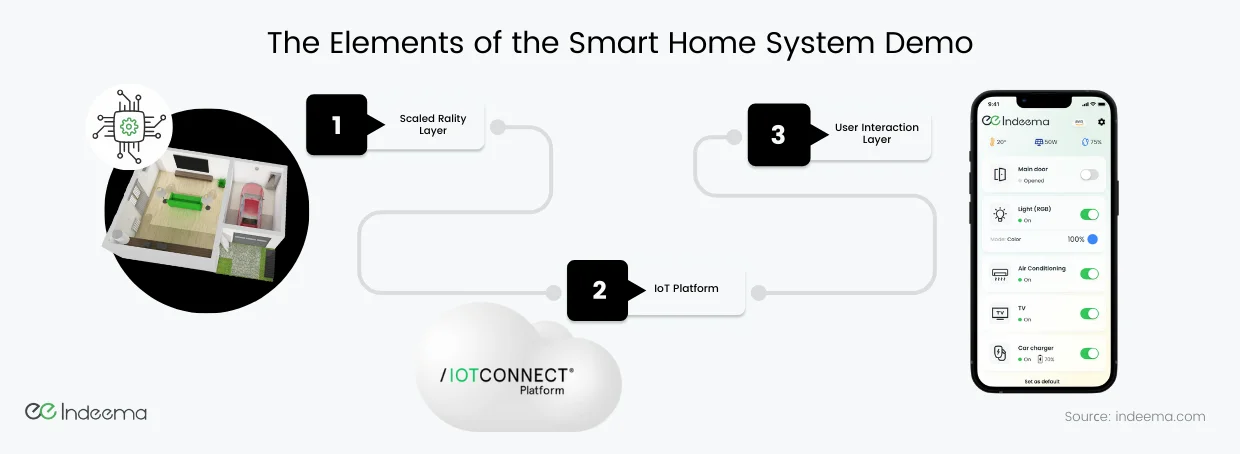
The demo is organised into three layers, and each one maps to a different engineering discipline:
- The physical layer: a house model in a suitcase. A living area and a garage with real sensors and actuators, wired to one microcontroller. It is portable, so the whole system can be shown on a table.
- The IoT platform. Device data arrives here, is stored and processed, and commands are routed back to the devices. In this build we used IoTConnect, a managed IoT platform running on AWS.
- The user interaction layer. An iOS app for everyday control and a web dashboard for history and trends. Both read from and write to the same platform.
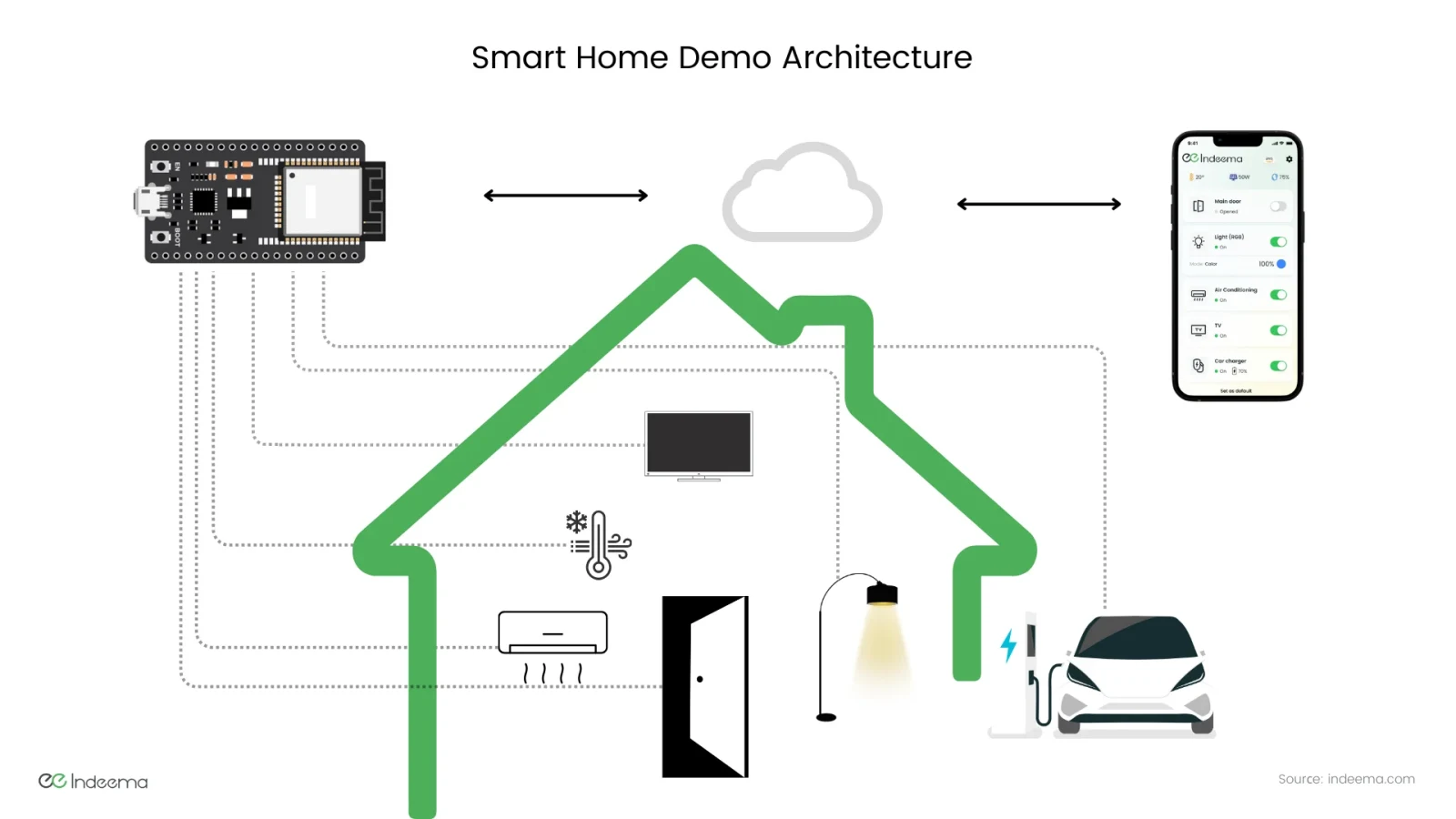
The features were chosen to reflect what homeowners actually use: solar energy generation with live output, EV charging with battery status, climate control linked to temperature and humidity readings, TV and lighting control, and access control through a motorised main door. Together they exercise every interface type a typical home product needs.
Architecture: from sensor to cloud to app
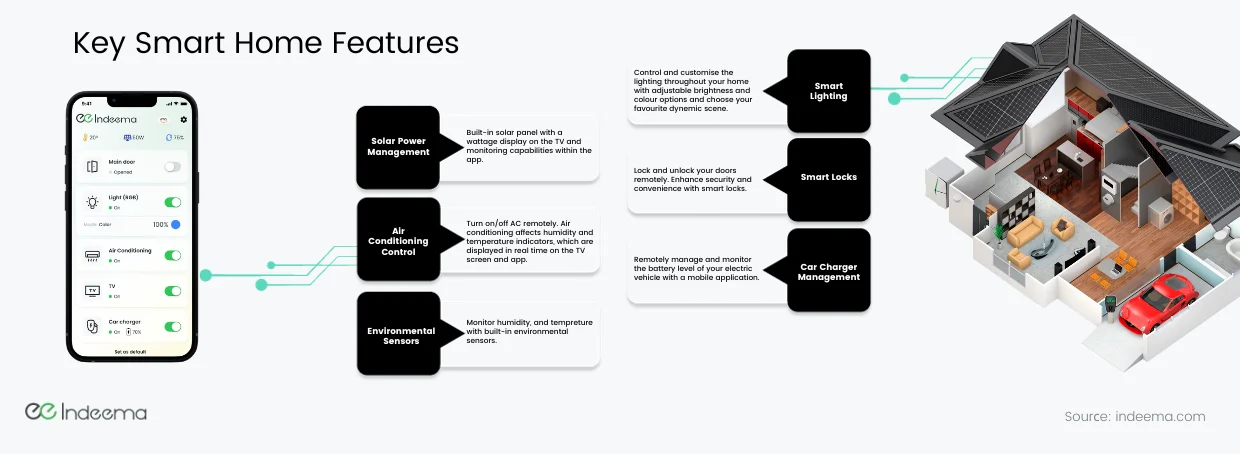
Every command in the demo follows the same path. The design goal was to make that path visible, because it is where latency, failures and security questions sit.
- User actionA person taps a control in the iOS app, or triggers a voice shortcut such as a scene.
- IoT platformThe platform authenticates the request and routes the command to the right device on the right controller.
- MicrocontrollerThe controller receives the cloud message over Wi-Fi and translates it into a signal on the right interface.
- DeviceA servo opens the door, a relay switches the TV, an LED strip changes colour.
- State reportThe controller reports the new state and sensor readings back through the platform to the app and dashboard.
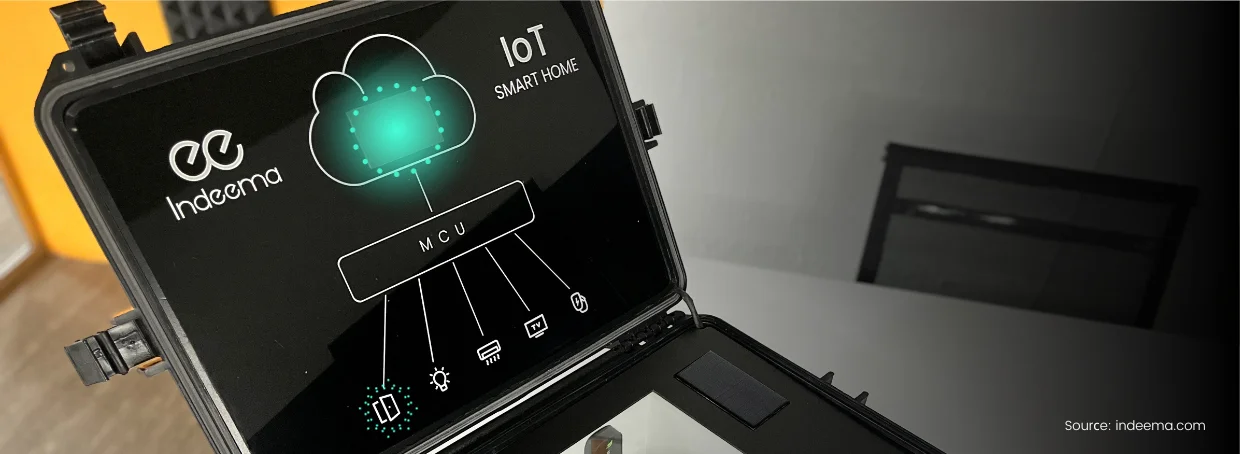
The lid panel lights up the cloud-to-controller and controller-to-device legs, so each message can be followed by eye.
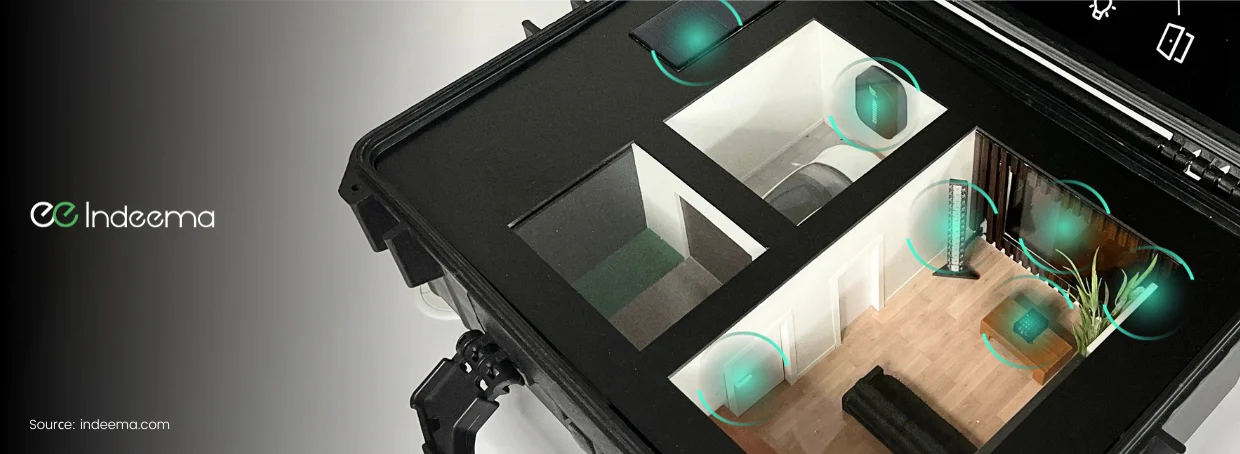
The house sits in the lower half of the case. The signal-flow panel is built into the lid: when a command is sent from the app, running lights show the direction of travel from cloud to microcontroller and from microcontroller to device. It turns an abstract architecture diagram into something a non-engineer can watch.
Selecting devices and their interfaces
The hardware in the case is deliberately ordinary: a servo motor that opens the main door, a DC motor for blinds or curtains, a temperature and humidity sensor, an addressable LED strip for lighting, a multicolour battery-level indicator for the EV charger, and a small display that summarises the state of the whole house.
What makes it representative is the mix of interfaces. A real home product rarely uses one bus for everything, and each interface brings its own timing, noise and failure behaviour that the firmware has to handle.
| Interface | What it does in the demo | Engineering point |
|---|---|---|
| PWM (pulse-width modulation) | Positions the servo and sets DC motor speed | Timing must stay stable while the controller also handles the network |
| GPIO on/off | Switches appliances such as the TV on and off | Simple, but the default state at boot decides what happens after a power cut |
| Digital one-wire | Reads the temperature and humidity sensor | Strict timing; readings need validation and retries |
| One-wire NRZ | Drives the addressable LED strip | Long data frames can block other work unless offloaded to a peripheral |
| GPIO control with analog readout | Controls a device and reads its level back, for example a battery indicator | Gives feedback, so the app shows the real state rather than the requested one |
| UART | Two-way data exchange, for example with the status display | Needs framing and error handling for real-time monitoring |
For a closer look at the hardware blocks inside each device, see smart home IoT devices and their hardware components.
Firmware: modular, low-power and updatable
The embedded team's goal was simple to state: devices with different origins and functions must communicate reliably through one controller. Three firmware decisions made that possible.
- Modular, scalable structure. Each device type is a separate module behind a common interface, so a new sensor or actuator can be added without reworking the rest of the system.
- Low power consumption. Devices sleep when idle and wake on events, so the system can run for long periods without its own consumption becoming a cost.
- Over-the-air (OTA) updates. Firmware can be updated remotely and centrally, so the household never has to update devices one by one. It is how fixes and security patches reach the field.
The firmware was also written to work with an IoT platform rather than a single app. In this build the controller talks to IoTConnect on AWS, which keeps the device side independent of how the data is used later.
The mobile app and the web dashboard
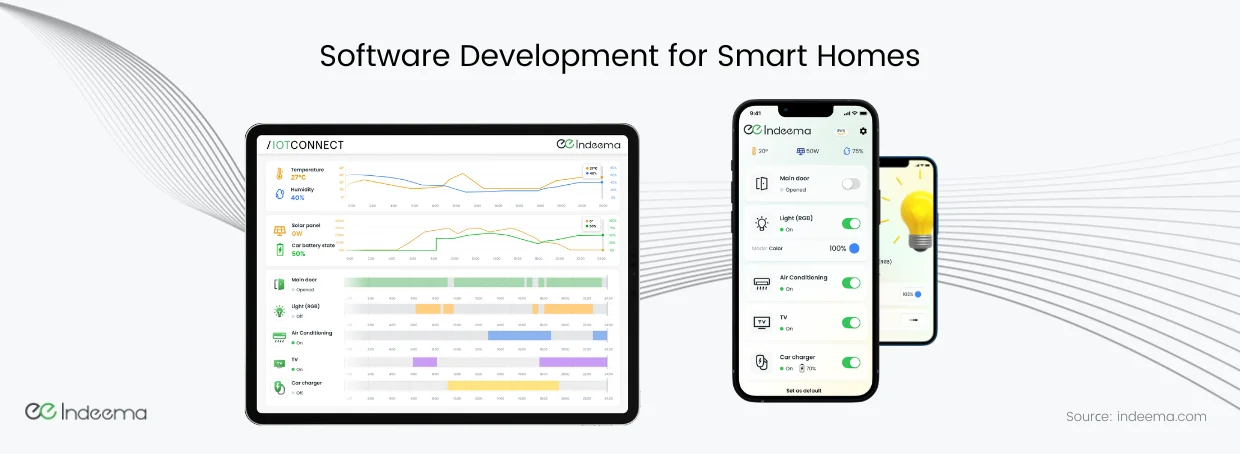
The iOS app is the everyday control centre. Its home screen lists every connected device with its state, and each device has its own settings screen, for example colour and brightness for the light. Further screens handle Wi-Fi set-up and switching between cloud platforms, which mattered for a demo used with different back ends.
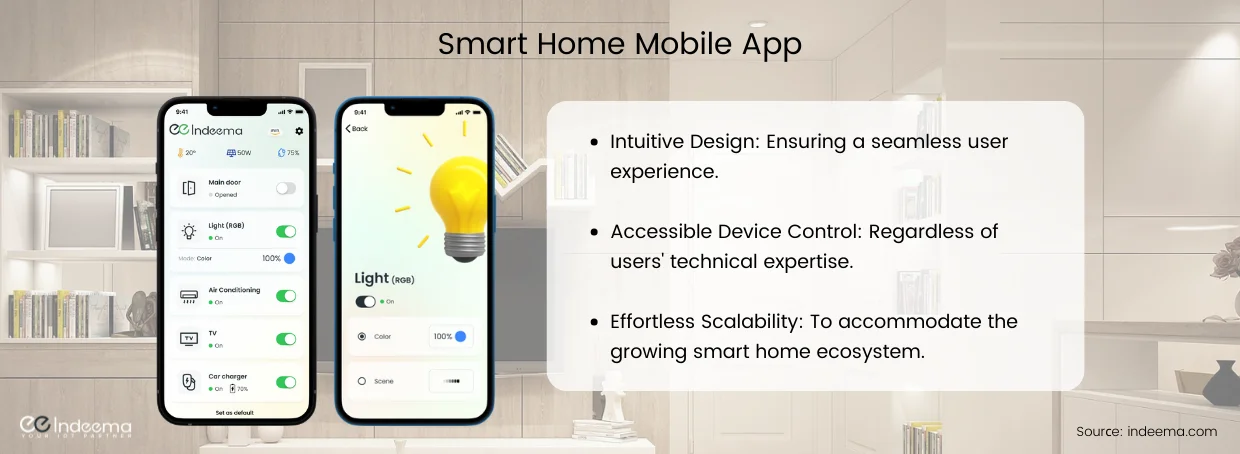
Voice control comes from iOS Shortcuts. Users can create their own voice commands for sequences of actions; in the demo, a "Movie Time" command dims the lights and turns on the TV. Scenes like this are where a smart home starts to feel useful rather than merely remote-controlled.
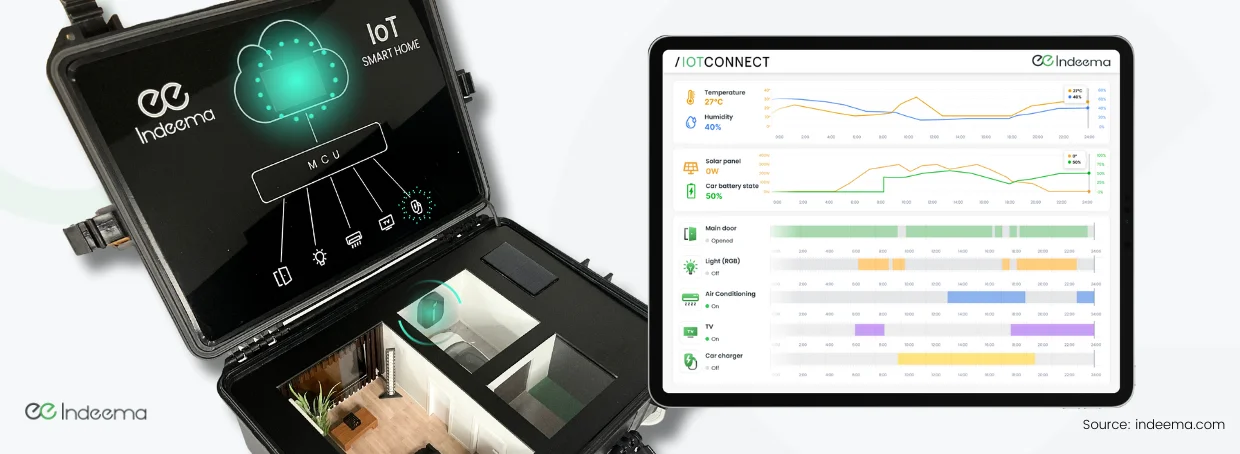
The web dashboard serves a different job: real-time and recent historical data from every device, so trends and usage patterns can be analysed. Temperature, humidity, solar output and car battery level are plotted over time, alongside a timeline of when each device was on.
Using a managed IoT platform
To manage devices and collect data we used a Platform-as-a-Service: Avnet's IoTConnect. A managed platform gives a team a ready-made foundation for device management, data collection, rules and notifications, so the effort can go into the product rather than into rebuilding infrastructure.
In the demo, the platform connects every device, stores real-time and historical data for analysis, triggers automated notifications and enforces the security controls between devices and applications. It can also connect to business systems such as CRM and ERP, which matters once a smart home product becomes a service with customers behind it.
The trade-off is that the platform's device model, pricing and security approach become part of your product. That is a decision to make deliberately; our guide to how to build a smart home ecosystem explains where cloud and local processing each belong.
Security and data privacy across the path
A smart home collects data about when people are home, how they live and who comes and goes. In the demo, protection is applied at every step of the path rather than only in the cloud:
Security controls in the demo
- Each device has an identity and authenticates before it can send data or accept commands.
- Certificates authenticate devices and users; servers are authenticated too, so neither side can be impersonated.
- Data is encrypted in transit and at rest.
- Communication channels between devices and the platform are secured against eavesdropping and tampering.
- Firmware updates are delivered over a secure channel.
- Every system action is logged, and the platform is monitored continuously so incidents can be detected and handled.
These controls are not features to add at the end. Device identity and update signing shape the manufacturing and provisioning flow, so they are decided with the hardware.
Engineering trade-offs
Managed IoT platform vs a custom cloud back end
- You gain
- A managed platform provides device management, data storage, rules, notifications and security controls from day one.
- You pay
- Its device model, pricing and roadmap become dependencies, and moving away later means migrating devices and data.
- Choose it when
- Use a managed platform to reach a working product quickly; plan a custom back end when scale, cost or differentiation demand it.
One central controller vs a controller in every device
- You gain
- One controller keeps wiring, firmware and debugging simple, and makes the signal path easy to see.
- You pay
- It is a single point of failure and does not reflect how independent consumer devices are installed in a real home.
- Choose it when
- Central control suits a demo, a fixed installation or a hub; separate devices sold individually need their own controller and radio.
Cloud-routed commands vs local control
- You gain
- Routing every command through the platform gives one source of truth, remote access and a complete history.
- You pay
- Every action depends on the internet connection and adds latency.
- Choose it when
- Keep safety-relevant actions, such as door access, working locally; use the cloud path for remote access, history and analytics.
What the demo teaches about planning a smart home product
The same checklist we used to build the demo applies to a production smart home system:
- Choose features from real household routines, then map each one to a device and an interface.
- Design firmware as modules behind one interface so new devices do not force a rewrite.
- Plan OTA updates and device identity before the hardware is fixed.
- Decide early which platform owns device management, data and rules, and what you would need to move away from it.
- Give the app and the dashboard different jobs: everyday control on the phone, trends and history on the web.
- Define what each device does when the network or the cloud is unavailable.
Where we've built this
The demo shows the architecture at table scale. In a client project we built the full version: a hub integrating leak detection, lighting, locks, fire alarms and heating control, with BLE onboarding in the app, an AWS back end and OTA updates in operation.
Case studyExtending a leak-detection product into a connected smart-home hubA production smart home system with the same layers as the demo: a hub that integrates many devices, firmware with OTA updates, a cloud back end and a mobile app.Was this useful?
Where this shows up in our work
SolutionConnected Product Engineering: One System, Not Isolated PartsWhen devices, firmware, cloud platform and apps must work as one product, our connected product engineering teams own the system end to end, as in this demo.For what changes when the same architecture has to work in real homes, with non-expert set-up, other makers' devices and changing networks, see Smart Home & Consumer IoT.
Apply this to your product
Discuss your connected product
Sources
- Avnet IoTConnect platform accessed 1 October 2026