


Insights / Hardware & Electronics
Sensors and Actuators in IoT: How Connected Devices Sense and Act
What sensors and actuators each do, where the decision between them belongs, and how to choose an actuator that behaves safely when something fails.

The short answer
In an IoT device, a sensor turns a physical condition (temperature, motion, moisture) into a signal. An actuator does the reverse: it turns a command into physical action, such as switching power, turning a motor or opening a valve. Between them sits a controller that decides what the reading means and what to do. Engineering a connected device means engineering that loop: what is sensed, where the decision runs, and what the actuator does when power, the network or the reading fails.
The loop: sense, decide, act
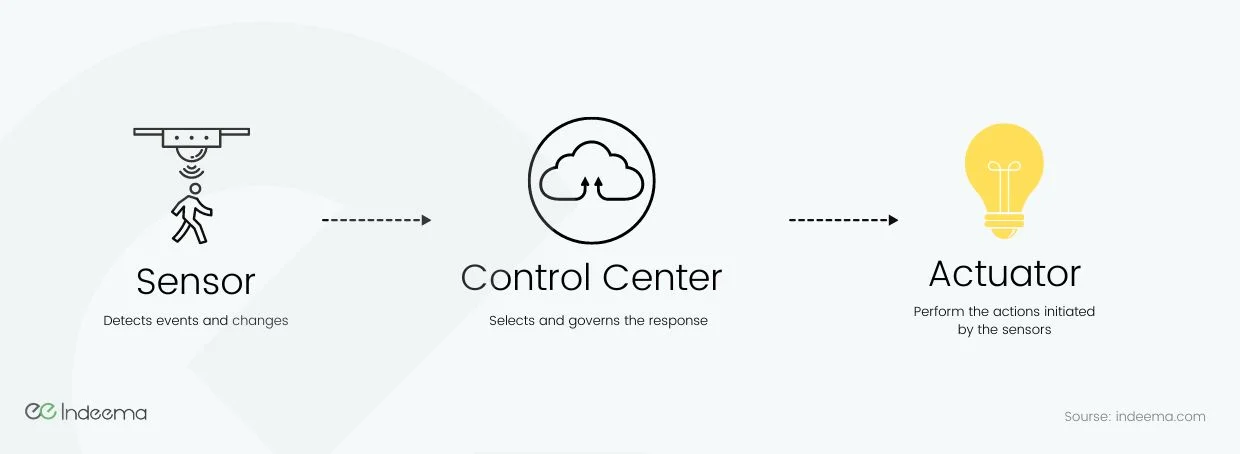
A connected device works like a small nervous system. Nerves in the skin sense heat, the brain decides, and muscles pull the hand away. In a device, sensors detect an event, a controller selects the response, and an actuator carries it out.
- Actuator (in IoT)
- The output component of a connected device: it converts an electrical command from the controller into physical action, such as motion, switching, opening or closing, sound or vibration.
Sensors are the device's inputs; the most common sensor types include temperature, motion, moisture and humidity, pressure, light and vibration. Actuators are its outputs. The value of the product sits in the loop that connects them.
Where the decision should run
Older descriptions of IoT often call the cloud the device's brain. For anything that acts on the physical world, that is usually the wrong place for the first decision. A round trip to the cloud adds latency and fails when the network does.
| Decision runs on | Good for | Watch out for |
|---|---|---|
| The device's own controller | Safety and timing-critical actions: shut a valve on a leak, stop a motor on overload | Limited compute; logic must be updated safely in the field |
| A local hub or gateway | Coordinating several devices in one place: scenes, interlocks | The hub becomes a single point of failure |
| The cloud | Schedules, optimisation across many sites, history and analytics | Latency, connectivity loss, and cost per message |
A practical rule: keep the safety-relevant loop on the device and add coordination and optimisation above it.
The five main actuator types
| Actuator | What it does | Typical use | What to check |
|---|---|---|---|
| Relay | Switches a power circuit on or off | Smart plugs, heaters, lighting, pumps | Contact rating for the real load and switching count; failure state |
| Solenoid | Short linear push or pull from an electromagnet | Locks, latches, small valves | Holding current and heat; behaviour on power loss |
| Motor (DC, stepper, servo) | Rotary motion, sometimes with position control | Fans, blinds, pumps, locks | Stall and overload detection; position feedback |
| Linear actuator | Straight-line motion over a stroke | Vents, adjustable furniture, industrial positioning | Force, speed and duty cycle; end-stop sensing |
| Valve actuator | Opens or closes a valve stem | Water shut-off, irrigation, HVAC | Fail-open or fail-closed; time to close |
Smaller outputs count too. A haptic motor that vibrates a wearable, a buzzer or a status LED are all actuators: they turn a decision into something a person can perceive.
The engineering implication: an action is not the same as a command
Sending a command to an actuator does not prove the action happened. A relay contact can weld, a valve can stick and a motor can stall. A dependable device closes the loop by sensing the result: current through the load, valve position, motor speed. It then reports the real state, not the requested one.
How to choose an actuator for a connected product
Work through these in order
- Define the physical job: force or torque, stroke or angle, speed, and how often it cycles.
- Set the failure state: what must happen on power loss, network loss or a controller fault.
- Choose how the result is verified: position, current or speed feedback.
- Size the power path: peak current, holding current and the effect on battery life.
- Check the environment: temperature, humidity, dust and the rated life in switching cycles.
- Keep the safety-relevant loop on the device; add hub or cloud logic for coordination.
Was this useful?
Where this shows up in our work
ExpertiseHardware and electronics engineering for connected productsSelecting sensors and actuators, designing the power path and adding feedback so the device reports what really happened is hardware and electronics work we own with the firmware team.Where actuators drive machines that have to keep running, the operating context changes the design. See Engineering connected products for machines that keep running.
Apply this to your product