


Insights / Drones & UAV
How We Built a Flight Controller Configurator for a UAV Client
A browser-based configurator that talks to a flight controller over a local serial link, so beginners can set up a drone without installers, drivers or internet access.

The short answer
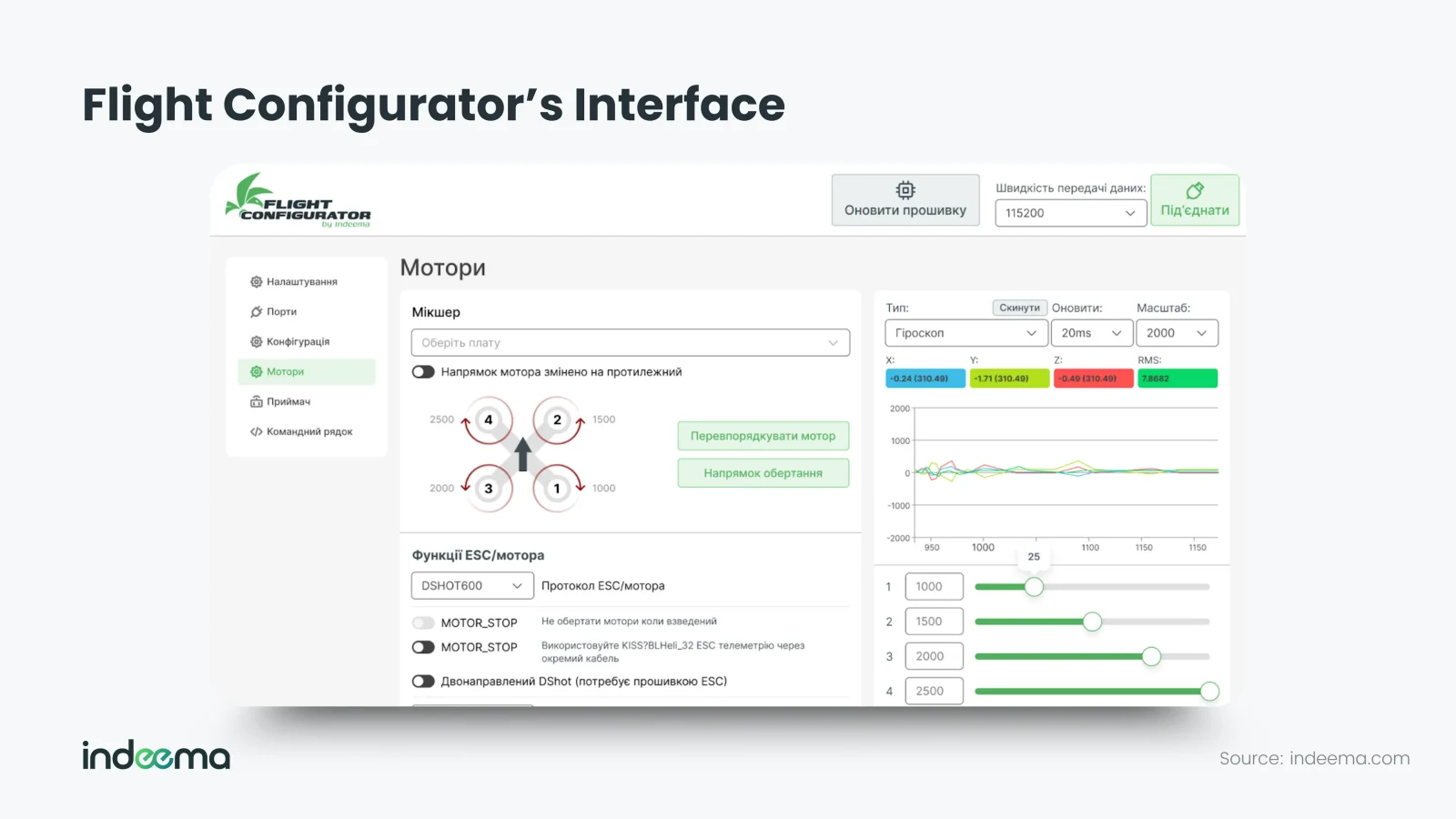
A flight controller configurator is the tool used to set up a drone after its firmware is loaded: flight modes, sensor calibration, motor order and ESC protocol, and safety limits. For Tykho Electronics, a Ukrainian maker of flight controllers and drone platforms, we built a lightweight configurator for beginners. It is a web application that runs locally in the browser, talks to the flight controller directly over a USB serial link using MSP messages, needs no internet connection or installed drivers, and ships with presets tuned for Tykho's flight stacks.
The context: firmware work that revealed a usability gap
Tykho Electronics develops electronics and UAVs, from flight controllers and flight stacks to complete drone platforms. Our cooperation began when Tykho needed firmware expertise to accelerate flight-controller development: we produced technical documentation, developed the electronics architecture and handled low-level firmware tasks.
Supporting the firmware gave us a close view of how people actually set up the product. Once the core deliverables were in place, we proposed, on our own initiative, a tool that would make that setup easier for Tykho's users, especially those new to drones.
Why drone setup is hard for beginners
A drone is not ready to fly when the hardware is built and the firmware is flashed. Every unit still needs configuration: flight modes, sensor calibration, motor parameters and safety limits all have to be set before a stable flight is possible.
Open-source configurators such as Betaflight and INAV are the standard for experienced pilots and engineers. They expose a great many settings, which is exactly what makes them overwhelming for newcomers and for businesses that only need a few essential steps.
The approach: a companion tool, not a competitor
The goal was not to replace full-scale configurators but to build a companion product for Tykho hardware. Taking inspiration from Betaflight, we kept only the essential setup steps and added presets tuned for Tykho's flight stacks, so users start from stable, tested defaults instead of a blank configuration.
| Aspect | Full open-source configurator | Companion configurator |
|---|---|---|
| Audience | Experienced pilots and engineers | Beginners and business users of one hardware family |
| Scope | Nearly every firmware setting | The essential setup steps only |
| Starting point | Generic defaults | Presets tuned for the maker's flight stacks |
| Installation | Desktop application | Opens in a browser and runs locally |
| Help | External documentation and forums | Built-in help explaining each parameter |
The configurator is built on the foundations of Betaflight and is also compatible with INAV firmware, which widens the range of drone applications it can serve.
Behind the interface: a browser talking directly to the flight controller
We built the configurator with Angular, a framework usually used for web front ends. Here there is no client-server model: the app runs locally and communicates with the flight controller directly over a serial port from the browser. That makes it independent of the operating system and driver setup, and it works without an internet connection, in a field, on a farm or at a remote site where last-minute calibration is needed.
The flight controller speaks MSP (MultiWii Serial Protocol), a compact binary protocol used by Betaflight and INAV. Our engineers wrote custom byte-level encoders and decoders so the browser could build each command and parse each response. To match the firmware exactly, the team studied Betaflight's open-source code to see how commands are structured and executed, then adapted those mechanisms to Tykho's firmware.
// MSP v1 request frame: '$' 'M' '<' | size | command | payload | checksum
// The checksum is the XOR of the size, command and payload bytes.
function encodeMspV1(command: number, payload: Uint8Array = new Uint8Array()): Uint8Array {
  const frame = new Uint8Array(6 + payload.length);
  frame.set([0x24, 0x4d, 0x3c, payload.length, command]);
  frame.set(payload, 5);
  let checksum = payload.length ^ command;
  for (const b of payload) checksum ^= b;
  frame[frame.length - 1] = checksum;
  return frame;
}Responses come back with a '$M>' header, or '$M!' for an error, and have to be reassembled from a byte stream that may arrive in fragments. Getting this reliable took patience, experimentation and some reverse engineering, but it moves the complexity from the user to the tool.
What this changes for a drone hardware maker
For a company that sells and maintains its own flight electronics, setup is part of the product. A configurator tuned to the hardware becomes a support and marketing instrument: fewer users stuck at first setup, consistent defaults across units, and a direct channel to the people flying the hardware. Partners testing the tool have already sent requests for enhancements, and it is expected to evolve alongside Tykho's flight systems.
If you are planning a configurator for your own hardware
- Decide who the tool is for and cut every setting that audience does not need.
- Ship presets tested on your own flight stacks as the starting point.
- Prefer a local, direct serial connection over a cloud dependency for setup tasks.
- Match the firmware's protocol exactly: study the reference implementation and test against real boards.
- Put help for each parameter next to the parameter.
- Check which browsers and devices support serial access on your users' platforms.
Where we've built this
Case studyFlight-controller and ESC electronics for a 7-inch drone flight stackFlight controller and ESC boards we designed to be compatible with Betaflight and BLHeli firmware: the hardware side of the same flight-stack ecosystem.For how we work across flight controllers, firmware and drone software, see UAV and drone systems engineering.
Was this useful?
Apply this to your product
Talk through your drone system
Sources
- Betaflight accessed 1 October 2026