


Insights / Hardware & Electronics
Types of IoT Sensors: What They Measure and How to Choose One
The main IoT sensor types, the physical principles behind them, and how to choose one by signal, power budget, interface and operating environment.


The short answer
IoT sensors turn a physical condition into data a device can act on. The most common types measure temperature, humidity and gas, pressure, level, proximity, motion, vibration and acceleration, rotation (gyroscopes), weight and force, light and infrared, with image, depth and touch sensors as more complex systems built on the same principles. Choosing one is less about the type than about four questions: what signal you really need, how much power the device can spend on it, how the reading reaches the microcontroller, and what environment it must survive.
Key takeaways
- Start from the decision the reading must support, then pick the quantity, range, accuracy and sampling rate that decision needs.
- The same quantity can be measured on different physical principles; range, drift, power and cost differ more than the label suggests.
- Sample fast enough for the signal: at least twice its highest frequency, more in practice for vibration and pulse.
- A sensor that goes quiet is a failure too. Monitor signal level, missed messages and silent nodes, not just the readings.
Why sensor choice decides what the product can know
Every connected product starts at a sensor. If the reading is noisy, drifts over months or arrives too slowly, no amount of cloud analytics recovers what was never measured. Sensor choice also fixes much of the rest of the device: its power budget, its enclosure, its calibration routine and how often someone has to visit it in the field.
That is why sensor selection belongs at the start of hardware design, alongside the radio and the power source, not at the end of a feature list. The questions below apply whether the product is a wearable, a smart building controller or a condition-monitoring unit on a factory motor.
What an IoT sensor is, and how a reading becomes data
- IoT sensor
- A component that converts a physical quantity, such as temperature, pressure, motion or light, into an electrical signal and then into digital values that a connected device can process, store and transmit.
Physical quantities are continuous; microcontrollers work with numbers. A sensor bridges the two with a sensing element that interacts with a force, medium or field, and a transducer that turns that interaction into an electrical signal. An analog-to-digital converter (ADC), either inside the sensor or integrated into the device's system-on-chip, turns the signal into values. Integrating the ADC on the SoC saves board space, external components and power, which matters in battery-powered devices.
- Sensing elementInteracts with the quantity being measured: heat, pressure on a membrane, light on a photodiode, a moving mass.
- Transducer and conditioningTurns the interaction into a voltage or current, then amplifies and filters it.
- ConversionAn ADC samples the signal into digital values, or a digital sensor delivers them over I2C, SPI or UART.
- Local processingThe microcontroller calibrates, filters and decides whether the reading matters.
- TransmissionThe radio sends the result, often a summary or event rather than every raw sample, to a gateway or the cloud.
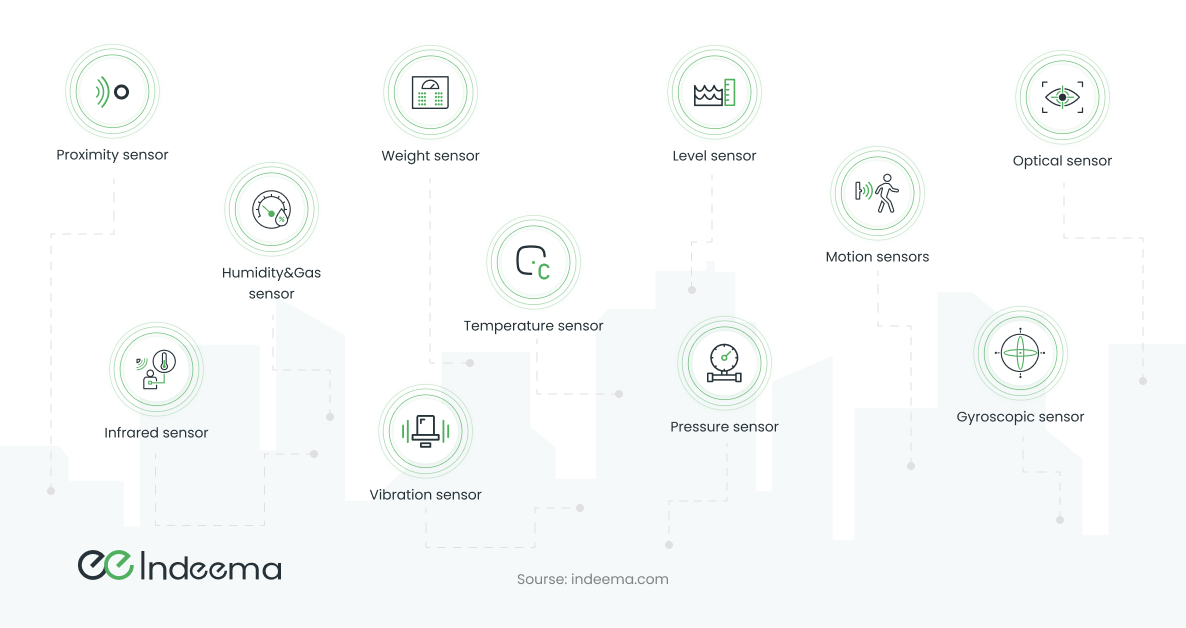
Sensors are the device's inputs. What happens next, the decision and the physical response through an actuator, is covered in sensors and actuators in IoT.
Three principles behind most simple sensors
Most simple sensing elements behave in one of three ways, and the principle decides the circuit you need around them, the accuracy you can expect and the cost.
| Principle | How it works | Typical sensors | What the circuit needs |
|---|---|---|---|
| Voltage generation | A physical effect creates a potential difference across the contacts, such as a conductor moving in a magnetic field or the thermoelectric effect. | Thermocouples, some magnetic and piezoelectric sensors | Usually amplification before the ADC; small signals are sensitive to noise |
| Resistance change | The element's resistance changes with force, temperature, a chemical or another property of the environment. | Thermistors, strain gauges, many gas and humidity sensors | A voltage divider with a known resistor; the ADC measures the voltage drop. Simple and cheap |
| Capacitance change | The distance between plates, or the material between them, changes the capacitance. | Pressure membranes, humidity sensors, proximity and touch sensors | Capacitance cannot be read directly; a charging circuit and usually an amplifier are needed |
Other elements rely on a specific physical effect: the photoelectric effect in photodiodes, the piezoelectric effect in some pressure and acceleration sensors, or a resonant frequency that shifts with temperature or mass. These are often more precise and more expensive. Resistive elements are the easiest to work with in electronics, which is why they appear in so many low-cost devices.
The common IoT sensor types
The list keeps growing as manufacturers learn to detect more signals and as device processors become capable of combining several sensors into one measurement. These are the types that appear in most connected products.
| Sensor type | Measures | Typical uses | What to check |
|---|---|---|---|
| Temperature | Heat, as resistance, voltage or a digital value | HVAC and thermostats, cold chain, equipment overheating, fire detection | Range, self-heating from nearby electronics, placement in the enclosure |
| Humidity and gas | Moisture, CO₂, VOCs and other gases | Ventilation control, air-quality monitoring, leak detection | Calibration drift, warm-up time, cross-sensitivity to other gases |
| Pressure | Force on a membrane: gas, liquid or barometric pressure | Boilers and water systems, tyre pressure, weather, blood-pressure monitors | Absolute vs relative measurement, overpressure rating, media compatibility |
| Level | Height of a liquid or bulk material | Tanks, fuel gauges, flood monitoring, liquid dispensing | Capacitive, optical, ultrasonic or float principle; foam and residue |
| Proximity | Presence or distance of a nearby object | Parking assistance, machine guarding, object counting | Capacitive, inductive, ultrasonic or photoelectric; target material and range |
| Motion | Movement of people or objects | Security, occupancy-based lighting, gesture input, activity tracking | False triggers, detection angle, standby power |
| Vibration and acceleration | Acceleration of a mass on a spring, read piezoelectrically or capacitively | Machine condition monitoring, screen orientation, fitness tracking | Frequency range, sensitivity, number of axes, sampling rate |
| Gyroscope | Angular velocity: the rate of rotation around an axis | Orientation and navigation, drones, sports and motion analysis | Drift over time; usually paired with an accelerometer |
| Weight and force | Load, usually as strain on a deforming element | Elevator overload, bulk loading, scales, packaging lines | Creep under constant load, temperature compensation, mounting |
| Infrared | Heat radiated by objects, or reflected IR from an emitter | Non-contact temperature, presence detection, pulse measurement in wearables | Field of view, ambient light and heat sources, emissivity of the target |
| Optical and light | Light intensity converted to current by the photoelectric effect | Screen brightness, daylight-aware lighting, rotation counting with optocouplers | Spectral response, dynamic range, contamination of the window |
Temperature: thermocouples, thermistors and RTDs
A thermocouple joins two different conductors; a temperature difference between its ends produces a measurable voltage (the Seebeck effect). Depending on the metals, thermocouples cover very wide ranges, roughly from −200 °C to +1500 °C, which is why industry uses them on heaters, furnaces and machinery. Their drawbacks are a small, non-linear signal and lower accuracy in some ranges.
Most modern thermistors are semiconductor devices: small, cheap, easy to place next to a chip and well suited to mass deployment in devices and buildings. Their range is much narrower, roughly −55 °C to 160 °C for typical parts. Platinum resistance thermometers such as the Pt100 sit in between: stable and accurate, and common in industrial measurement points.
Pressure, acceleration and humidity
Pressure sensors read the deformation of a membrane: as a change in capacitance between plates, as a change in resistance of a strain gauge bonded to it, or through the piezoelectric effect. Piezoelectric absolute-pressure sensors can be small enough for phones and watches. Digital scales use the same idea, since weight is pressure on a surface.
Accelerometers suspend a small mass on springs and measure how far it shifts under acceleration. The same part that rotates a phone screen can monitor the vibration of a machine or a building, if its frequency range and sensitivity fit the signal. Humidity sensors are mostly capacitive or resistive elements built on a moisture-absorbing polymer; thermal designs that compare a wet and a dry chamber tolerate higher temperatures but can be disturbed by other gases.
Complex sensors: optical, ranging, imaging and touch
Many of the sensors in phones, wearables and robots do not measure a quantity directly. They combine emitters, detectors and processing to calculate it from a stream of raw data. That puts more of the engineering into firmware and signal processing.
Photodetector systems and optical pulse measurement
An optocoupler pairs an LED with a photosensor; a slotted wheel between them turns rotation into countable pulses. Optical displacement sensors, as in a computer mouse, add a second optical path and a small matrix of photosensitive elements, so the processor can work out both direction and speed of movement. Industrial equipment and printers use the same principle for non-contact position control.
Wearables estimate pulse and blood-oxygen saturation the same way. Blood absorbs and reflects light differently as capillaries fill, so a photodetector tracks the change in reflected light over time; saturation compares the response at two wavelengths, typically red and infrared. The sampling rate must be at least twice the highest heart rate expected, and the sensor must stay over the same patch of skin, which is why a loose band gives poor readings during exercise.
Rangefinders, LIDAR and time-of-flight
A laser rangefinder sends light towards a target and times the reflection. Because light is so fast, many rangefinders modulate the signal and measure the phase shift between what was sent and what came back. LIDAR repeats the measurement in many directions with moving optics to build a map of the surroundings; units have become far smaller and cheaper and now appear in vehicles, drones and robot vacuum cleaners.
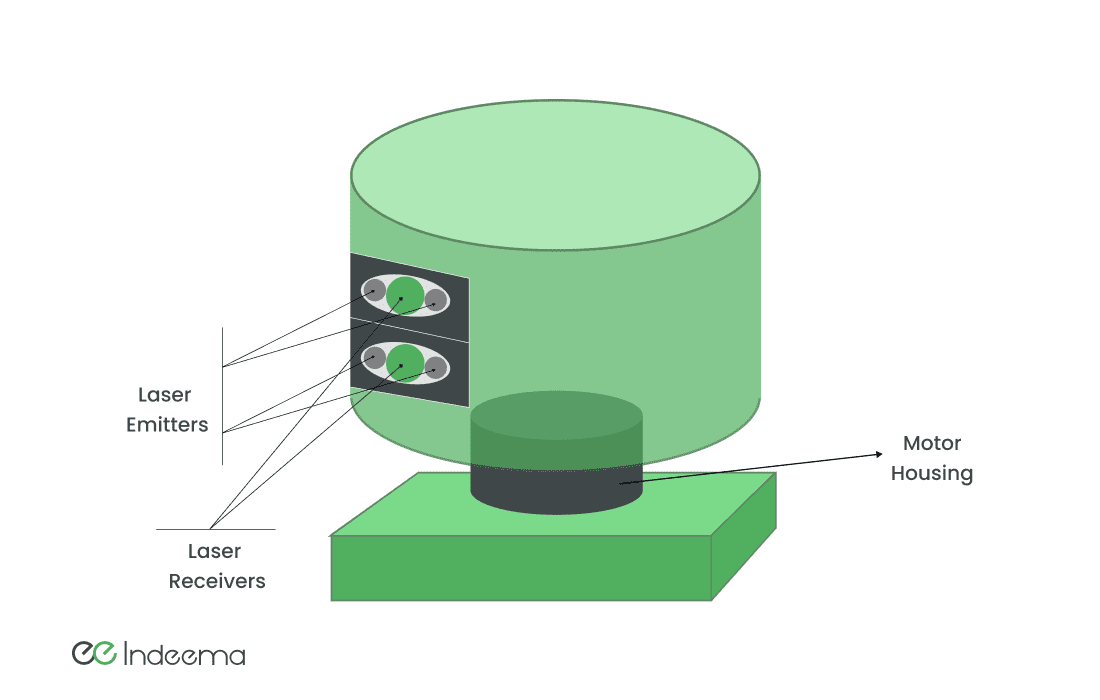
Depth cameras either compare images from two or more cameras spaced apart, like binocular vision, or use time-of-flight: a pulsed infrared source lights the scene and the sensor accepts only light that returns with the right timing. Both produce a 3D point cloud, used for face authentication, gesture control and robot navigation.
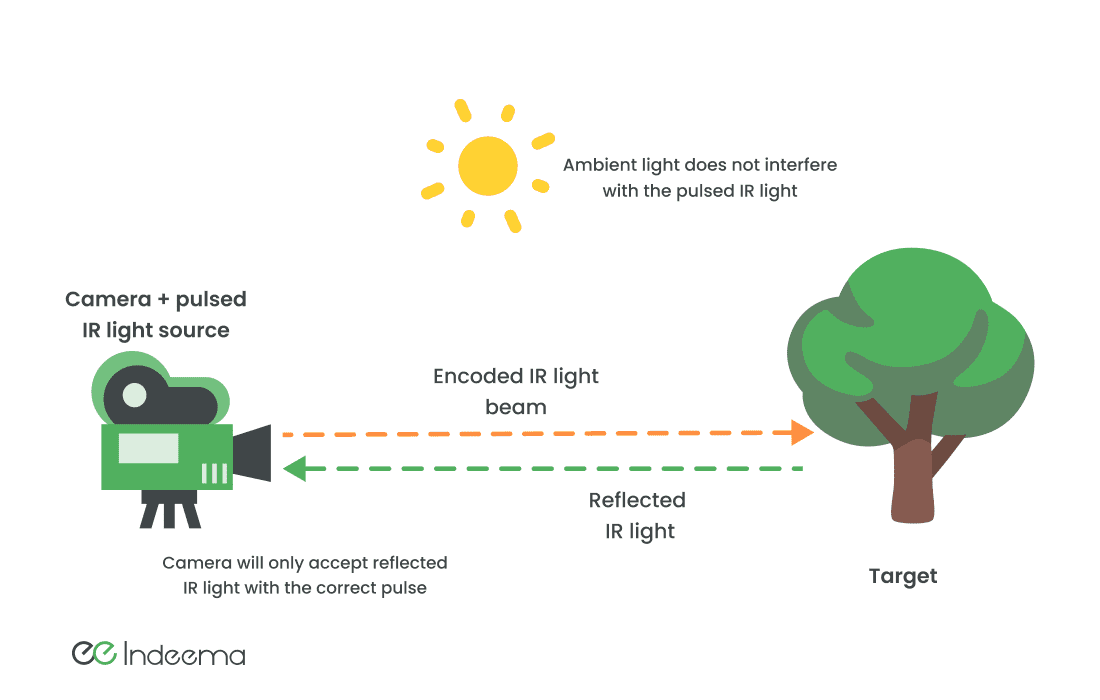
Image sensors
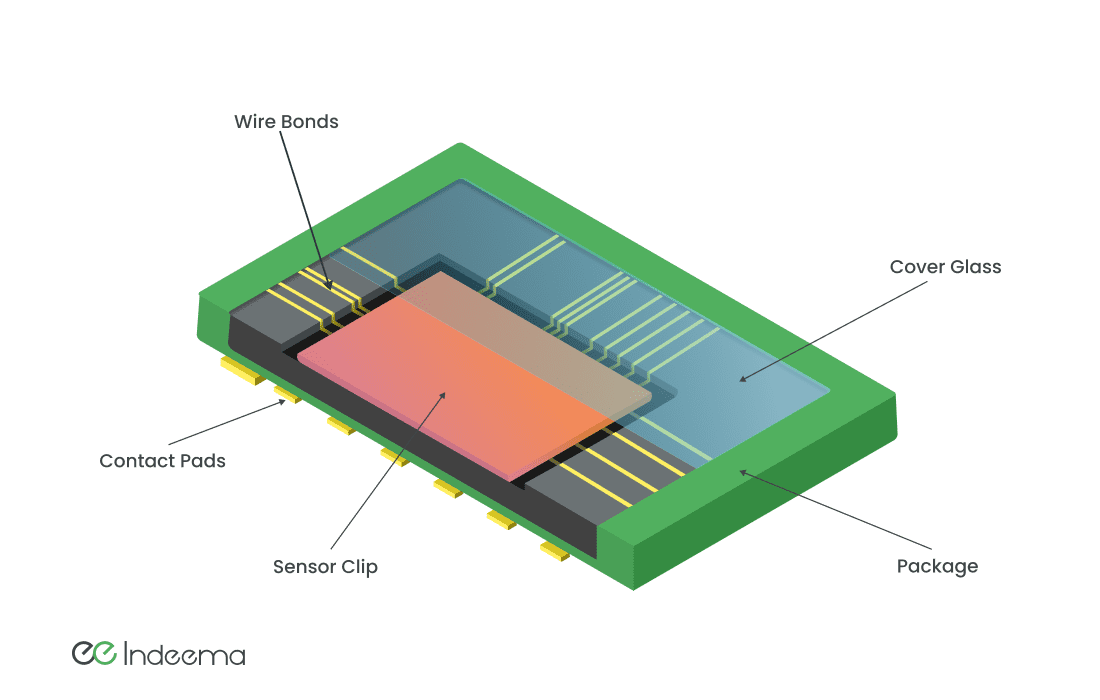
An image sensor is a large matrix of light-sensitive elements on one integrated circuit. CCD sensors historically offered better sensitivity; CMOS sensors are cheaper and more energy-efficient and are now used in almost all portable devices and surveillance cameras. Infrared-sensitive arrays are the basis of thermal imagers.
Touch sensors and fingerprint scanners
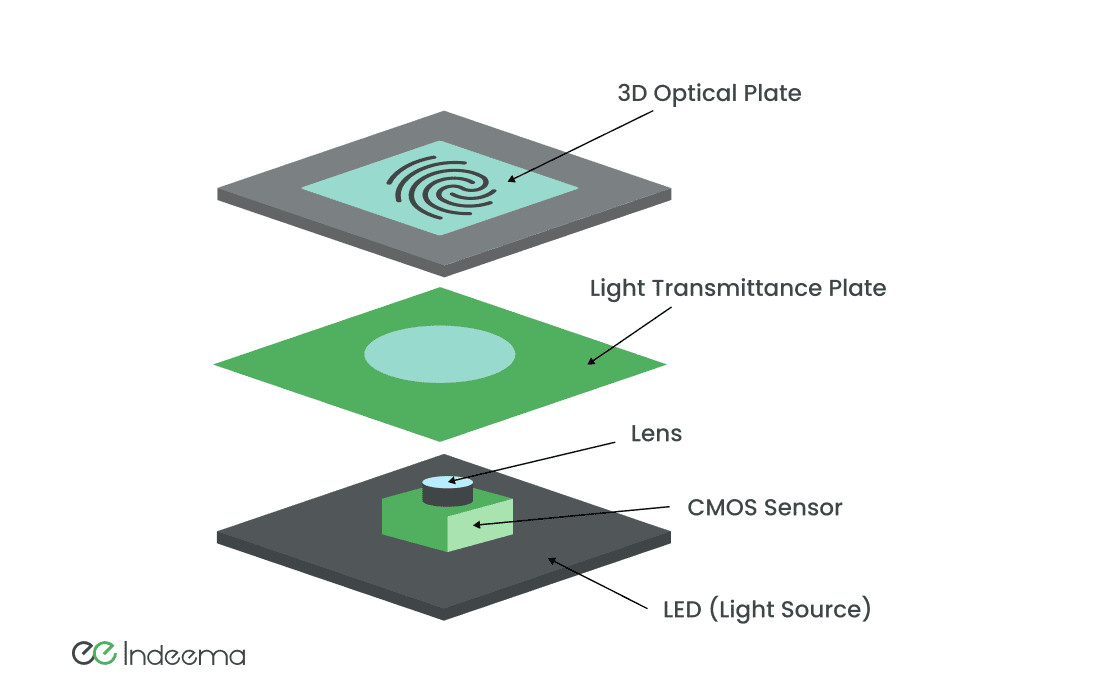
Capacitive touch has replaced almost every other touch technology. A lattice of transparent electrodes measures the capacitance between them, and a finger adds to it. Capacitive fingerprint sensors use the same idea at far higher resolution, which makes noise from the environment and the device itself the main design problem. Optical fingerprint sensors instead light the finger and image the ridges through a lens onto a CMOS sensor.
Wireless sensor nodes and networks
A wireless sensor node combines the sensor with a microcontroller, a radio transceiver, an internal antenna or a connector for an external one, and a battery that can sometimes be replaced by an energy-harvesting element. A set of nodes reporting to a gateway forms a wireless sensor network (WSN). The gateway or a platform behind it processes the data and triggers a response, such as switching on ventilation when a room gets too warm.
Wireless matters most where cables are impractical. In machinery condition monitoring, sensors often need to sit on rotating or moving equipment where wiring would get in the way of the process. In healthcare, wearable sensors replace wired leads so that vital signs can be monitored while the patient moves. In homes and buildings, battery-powered motion, temperature and leak sensors can be installed without opening walls.
A network can include hundreds or thousands of nodes, each sending regularly, so the sensors themselves need monitoring. Planning should establish the signal level at which the gateway stops hearing a node, then set alerts around it.
- Signal levelAlert when received signal strength approaches the level at which the gateway would stop hearing the node.
- Signal dropAlert when signal strength falls sharply from one message to the next; it often precedes a fault.
- Missed messagesFlag gaps in the expected sequence, which point to interference or a failing sensor.
- Silent nodeRaise an alarm when a node has not reported for longer than its threshold, for example 30 minutes for a 10-minute reporting interval.
- NotifyDeliver the alert to the team by email, a dashboard or a message broker such as MQTT.
Range, battery life and data rate pull against each other in the radio choice. For low-power wide-area options, see NB-IoT explained; for how sensors fit with the other hardware blocks of a home device, see smart home device hardware.
From readings to maintenance decisions
Before connected sensors, maintenance staff measured temperature, humidity or vibration on critical assets by hand during periodic rounds. Sensors replace that with continuous, automatically recorded data that can be checked remotely, which reduces manual effort and recording errors.
The value appears when the readings are integrated with the software that plans work, such as a computerised maintenance management system (CMMS). Several sensors measuring different aspects of one machine build a history of the conditions just before a failure or near miss. That history is what makes it possible to recognise the pattern next time and act before the failure.
Engineering trade-offs
Integrated digital sensor vs analog sensing element
- You gain
- A digital sensor arrives calibrated, with its own ADC and a simple bus interface, so firmware and board design are faster.
- You pay
- Less control over sampling, filtering and range; supply and pin-compatible second sources can be harder.
- Choose it when
- Digital for common quantities at volume; an analog element when you need unusual ranges, high sample rates or full control of the signal chain.
Wired vs wireless sensor nodes
- You gain
- Wireless nodes go where cables cannot, such as moving machinery, patients and finished buildings, and install quickly.
- You pay
- Every node needs a power budget, a radio link to plan and monitor, and battery maintenance.
- Choose it when
- Wireless when cabling is impractical or costly; wired where power is available and readings are continuous or safety-critical.
Processing on the device vs streaming raw data
- You gain
- Summarising on the device, for example a vibration spectrum or an event, saves radio power and bandwidth.
- You pay
- It needs more capable firmware and a way to update the algorithm in the field; raw detail is lost unless captured on demand.
- Choose it when
- Process locally for high-rate signals and battery devices; stream raw data during development or when the analysis is still changing.
Sensor selection matrix
Four questions decide most sensor choices. This is how they play out for common sensing jobs.
| Device | Signal you actually need | Power profile | Interface to the MCU | Environment to check |
|---|---|---|---|---|
| Room temperature and humidity | Slow-changing; one reading per minute or less is usually enough | Very low; sample, transmit, sleep | Digital sensor over I2C, or a thermistor on an ADC pin | Self-heating from the board, airflow through the enclosure |
| Machine vibration | Frequency content up to the fault frequencies of the machine | High during capture; process on the device and send summaries | Accelerometer over SPI, or analog through a high-rate ADC | Mounting stiffness, temperature, dust and oil |
| Occupancy or motion | An event, not a continuous value | Very low; the sensor wakes the MCU on detection | Digital interrupt line | Heat sources, pets, lens angle and mounting height |
| Pressure or level in a tank or pipe | Absolute or relative value at a defined accuracy | Low; periodic sampling | Analog current or voltage loop, or a digital interface | Media compatibility, overpressure, freezing and condensation |
| Pulse or blood oxygen on the body | A waveform sampled well above twice the highest heart rate | Moderate; the emitter LEDs dominate | Integrated optical front end over I2C or SPI | Skin contact, movement, ambient light |
| Depth or distance for a robot | Range and resolution across a field of view | High; emitter plus processing | Dedicated ToF or LIDAR module with its own processor | Sunlight, reflective or dark surfaces, dust on the window |
Decision rule: Write down the decision the reading supports first, then fix sampling rate and accuracy, then power and interface. Choose the part last, and test it in the real enclosure and location.
Before you commit to a sensor
A short checklist that turns a sensing idea into a hardware requirement:
- State the decision the reading supports and what happens if the reading is wrong or missing.
- Define range, accuracy over the product's life and the sampling rate the signal really needs.
- Measure the sensor's real power draw in your duty cycle, including warm-up and conversion time.
- Choose the interface (analog, I2C, SPI, interrupt) and check it against the MCU's pins and ADC.
- Test in the real enclosure and installation: heat from electronics, airflow, mounting and contamination.
- Plan calibration, self-test and health monitoring so a drifting or silent sensor is detected.
Common mistakes
Choosing by the datasheet accuracy figure alone
Drift, self-heating and placement errors in the field exceed the headline accuracy.
Instead: Specify accuracy over the product's lifetime in the real enclosure, and plan recalibration.
Sampling too slowly
Vibration faults or pulse peaks fall between samples and the data looks clean but is wrong.
Instead: Sample at least twice the highest frequency of interest, with margin, and filter before the ADC.
Streaming every raw sample over the radio
Batteries drain and the network saturates as the fleet grows.
Instead: Process on the device and send summaries or events; capture raw data on demand.
Treating silence as normal
A node with a dead battery or a blocked signal goes unnoticed until the data is needed.
Instead: Alert on signal level, missed messages and nodes that stop reporting.
Where we've built this
Matching the sensor to the signal shaped a machinery condition-monitoring product we built. The work covered integrating multichannel accelerometers into the diagnostic unit, embedded acquisition with calibration and self-diagnostics, and the monitoring software that turns vibration into condition views and alerts.
Case studyTurning machine vibration into condition-monitoring viewsA vibration diagnostic unit for rotating machinery, where the accelerometer's frequency range, sensitivity and sampling had to match the machine before any analytics could help.Questions engineers ask
How are sensors used in IoT?
A sensor converts a physical condition into digital data. The device's microcontroller filters and interprets it, and the device either acts locally or sends the result to a gateway or cloud platform, where it feeds dashboards, alerts and automated decisions.
What are IoT sensors that detect the presence or absence of nearby objects called?
Proximity sensors. They use capacitive, inductive, ultrasonic or photoelectric principles to detect an object, and often its distance, without touching it.
Which type of electronic sensor is the least complex and expensive?
Sensors that behave like resistors, such as thermistors and many humidity and gas elements. A voltage divider and the microcontroller's built-in ADC are often enough to read them.
How do you choose a wireless sensor for remote industrial monitoring?
Start from the signal the decision needs, its range and sampling rate. Then check the power budget against the reporting interval, the radio range on the real site, the mounting and environmental rating, and how the network will detect nodes that stop reporting.
Was this useful?
Where this shows up in our work
ExpertiseHardware and electronics engineering for connected productsWhen the open questions are which sensor, which signal chain, what power budget and how to make it survive the installation, our hardware and electronics engineers own those decisions with the firmware team.Where sensors watch machines that have to keep running, mounting, wiring and maintenance routines change the design. See Engineering connected products for machines that keep running.
First published
Apply this to your product