


Mobile application / Connected camera
iOS and Android companion app for a Wi-Fi cameraMobile app UX/UI redesign and iOS/Android development
Redesigning the companion app for a Wi-Fi shot-recording camera
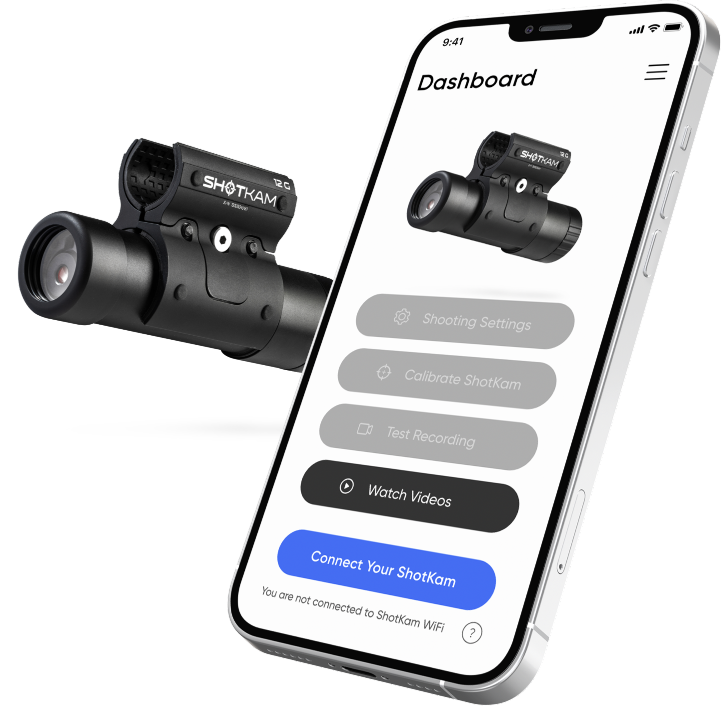
ShotKam makes a compact camera that attaches to a gun and records each shot as a short video clip, used by hunters and sport shooters to review their shots. The camera already existed; its owners view and manage recordings through a mobile app.
ShotKam needed redesigned iOS and Android apps that give camera owners a clearer experience: connect to the camera wirelessly, play back clips straight away and adjust camera settings, with new features, interactions and visual style.
- Product
- iOS and Android companion app for a Wi-Fi camera
- Buyer
- Makers of an existing connected camera or device whose companion app needs a better user experience
- Engagement
- Mobile app UX/UI redesign and iOS/Android development
- Indeema scope
- System overview, UX/UI redesign, iOS and Android development
The product need
What had to become possible
ShotKam needed redesigned iOS and Android apps that give camera owners a clearer experience: connect to the camera wirelessly, play back clips straight away and adjust camera settings, with new features, interactions and visual style.
Ownership, made clear
Where the work started and what Indeema owned
Starting system
ShotKam camera
The camera hardware, its optics and its recording behavior are ShotKam's own product and were not part of Indeema's work.
Third-party camera API
The camera's API was developed by a third-party company and was still being developed while the apps were built.
Existing mobile apps
Earlier iOS and Android apps existed and were redesigned.
Indeema owned
System overview
Prepare, together with the client's team, a high-level overview of the system components and how they interact.
UX/UI redesign
Redesign the app experience and interface around the product's value proposition, adding new features, interactions and style.
iOS and Android development
Build the redesigned apps in Swift, Objective-C and Kotlin.
Worked with
Wi-Fi connection to the camera
The apps connect to the camera wirelessly to transfer and play recorded clips on a phone or tablet.
Camera API
Playback and settings run through an API owned and developed by a third party.
Product constraints
What made the engineering difficult
- 01
Building on an API in progress
The camera API was being developed by another company at the same time, so issues had to be managed across teams during development.
- 02
Making device settings understandable
Camera options such as device profile, target type, recoil-trigger sensitivity and reticle type had to be easy to change from a phone.
- 03
Fast review after each shot
Each recording needed to be viewable in the app immediately, over a wireless link to the camera.
Engineering judgement
Decisions that shaped the product
Map the system before redesigning
A shared component-and-interaction overview with the client's team set the boundary between the app, the camera and the third-party API.
Redesign around the core loop
The app experience was organized around connecting, reviewing the latest clips and adjusting settings.
Native apps on each platform
The apps were built natively for iOS and Android.
Delivered product capability
What the product can do
- 01
Wireless connection
Connect the app to the ShotKam camera and play videos on a phone or tablet.
- 02
Clip playback
View each recorded clip in the app, including playback-speed control for review.
- 03
Camera settings
Configure device profile, target type, recoil-trigger sensitivity, reticle type and other camera options from the app.
- 04
Redesigned interface
A new UX/UI with updated features, interactions and visual style on iOS and Android.
Product change
What changed for the product team
ShotKam owners received redesigned iOS and Android apps for connecting to the camera, reviewing recorded clips and adjusting camera settings.
For a company with an existing connected camera or device, the case shows a companion-app redesign delivered against a third-party API still in development, with a shared system overview to keep app, device and API responsibilities clear.
- Delivered redesigned iOS and Android companion apps for wireless connection, clip playback and camera settings.
Technology, in context
Swift · Objective-C · Kotlin · Wi-Fi
A comparable product problem?
ShotKam camera companion app
Bring the product context, the system that already exists and the engineering decision you need to make.