


Insights / Applications / Product Experience
IoT Mobile App Examples: How Connected Devices and Apps Work Together
What IoT mobile apps do across homes, health, farms and buildings, how the device reaches the phone, and the lessons from building an air-quality monitor and its app.


The short answer
An IoT mobile app is the part of a connected product that people actually touch: it sets the device up, shows what its sensors measure, sends commands and raises alerts. Common examples include smart home control, wearables and health monitors, farm and field monitoring, vehicle and fleet tracking, and building energy apps. Behind each one is the same question: how does the device reach the phone? Directly over Bluetooth LE, through Wi-Fi and a cloud platform, via a hub for Zigbee, Z-Wave or Thread devices, or over cellular for devices far from any home network. That choice shapes set-up, latency, offline behaviour and cost.
Key takeaways
- The app is only as good as the device-to-app path behind it. Choose BLE, Wi-Fi to cloud, hub or cellular before designing screens.
- Most IoT apps do the same five jobs: onboarding, live status, control, alerts and history. The industry changes the data, not the jobs.
- Onboarding is the hardest screen to get right; it is where most users decide whether the product works.
- Alerts need thresholds the user sets, delivered by push from the back end, not by an app that polls.
Why the app decides how a connected product is judged
Fitness trackers, baby monitors, smart locks, air-quality monitors: for most people the device disappears into the room and the phone becomes the product. If set-up fails, readings lag or an alert arrives late, the hardware is blamed, however good it is.
That is why IoT app ideas are best judged from the device outwards. An app idea is viable when the device can deliver the data the app promises, at the speed and reliability the user expects, over a connection that works where the device actually lives.
Real-world IoT mobile app examples by category
The categories below cover most connected products on the market. Each pairs a device with an app that does a recognisable set of jobs, and each tends towards a particular connectivity pattern.
| Category | Typical devices | What the app does | Usual device-to-app path |
|---|---|---|---|
| Home automation | Lights, thermostats, locks, cameras, plugs | Remote control, scenes and schedules, alerts, energy use | Wi-Fi to cloud, or a hub for Zigbee, Z-Wave and Thread devices |
| Wearables and fitness | Trackers, smartwatches, smart scales | Sync activity and sleep data, trends, goals | Bluetooth LE to the phone, phone to cloud |
| Personal health monitoring | Blood-pressure cuffs, glucose monitors, connected inhalers | Record readings, share with clinicians, reminders | Bluetooth LE to the phone, phone to a clinical back end |
| Indoor environment | Air-quality monitors, ventilation and purifier controls | Live readings per room, thresholds and alerts, history | Wi-Fi to cloud |
| Agriculture and field monitoring | Soil and weather stations, irrigation controllers, livestock sensors | Maps, alerts, equipment and irrigation control | Cellular or a field gateway to cloud |
| Vehicles and mobility | Telematics units, e-bikes, trackers | Location, trip history, diagnostics, remote functions | Cellular to cloud, Bluetooth LE for nearby control |
| Building and energy | Meters, solar inverters, lift and HVAC monitors | Consumption dashboards, faults, reports | Wi-Fi, Ethernet or cellular to cloud |
Two things stand out. First, the jobs repeat: almost every app onboards a device, shows live status, sends commands, raises alerts and keeps history. Second, the connectivity path differs by where the device lives and how much power it has, and that difference drives most of the engineering.
How an IoT device and a mobile app connect
Whatever the category, data and commands travel along the same chain. The parts of the chain a product needs depend on the radio and where the logic runs.
- ProvisionThe app finds the new device, usually over Bluetooth LE or a QR code, and passes it network credentials and an owner.
- ReportThe device sends sensor readings and state over its radio, directly, through a hub or to a cloud platform.
- ProcessThe cloud or hub stores the data, checks it against rules and thresholds, and exposes it through APIs.
- Present and alertThe app shows live values and history; the back end pushes a notification when a value crosses a limit.
- CommandA tap in the app returns along the same path, is authenticated and changes the device's state.
Over-the-air firmware updates travel the command path too, so the app and back end must plan for them from the start.
Radios and protocols
| Connection | Suits | Works without a home network? | Watch out for |
|---|---|---|---|
| Bluetooth LE, direct to the phone | Wearables, health devices, locks, set-up of almost any device | Yes, while the phone is nearby | No remote access unless the phone or a hub relays to the cloud |
| Wi-Fi to a cloud platform | Cameras, thermostats, air-quality monitors, appliances | No | Power draw; depends on the customer's router and set-up |
| Zigbee, Z-Wave or Thread through a hub | Battery sensors, switches and lights in a home mesh | Yes, inside the home, if automations run on the hub | Needs a hub or Thread border router; Matter shapes compatibility |
| Cellular (LTE-M, NB-IoT or LTE) | Trackers, vehicles, remote sensors far from Wi-Fi | Yes | Data contract per device, coverage and power budget |
Cloud services and APIs
For anything beyond Bluetooth range, the app rarely talks to the device directly. Devices publish data to a cloud platform, commonly over MQTT, and the app reads it and sends commands through the platform's APIs. The same platform manages devices remotely and delivers firmware updates. If devices use different protocols, a hub or gateway aggregates them and gives the app one consistent interface.
What the app itself must handle
- Security and authentication: only authorised users can see data or control a device, and traffic between device, cloud and app is encrypted.
- Real-time data and notifications: readings, status changes and warnings arrive quickly, and alerts reach the user even when the app is closed.
- User interface: remote control, scheduling and data visualisation that work across screen sizes.
- Power awareness: battery-powered devices report their battery level, and the app reflects it so users are not surprised by a dead sensor.
- Scale and interoperability: the app stays usable as a household or business adds devices, including devices from other makers.
- Firmware updates: the app may start or report over-the-air updates, so it needs clear progress and failure states.
- History and analytics: stored data lets users compare periods and spot patterns, not only read the current value.
Example: an air-quality monitor and its companion app
UBreez is an indoor air-quality product we built end to end: the UBox device, a cloud platform and the UBreez app for iOS and Android. The device measures temperature, relative humidity, pressure, CO₂ and VOC levels. Users set the ranges they consider acceptable and receive a notification in real time when a value moves outside them. It works the same way in a home, an office or a classroom.
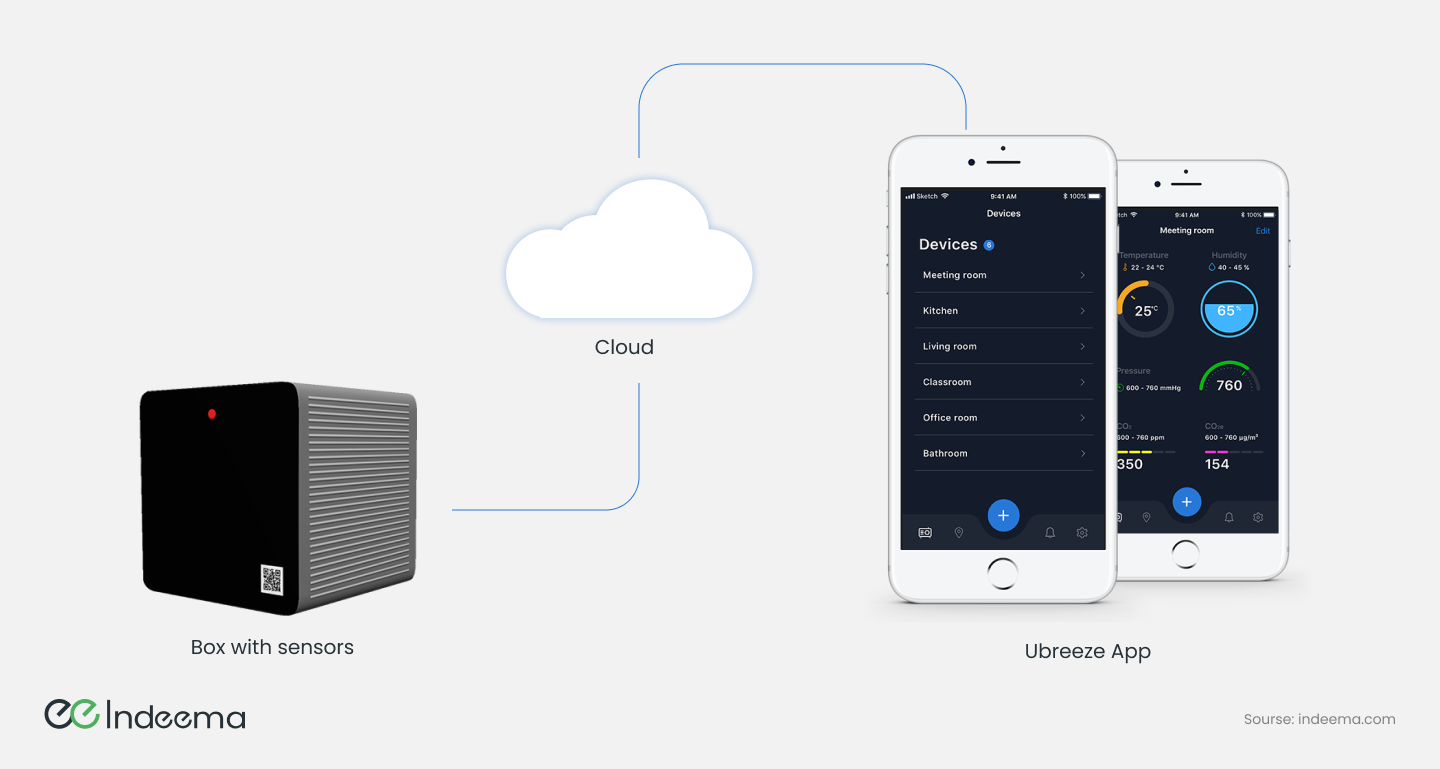
How the system is built
- Device: built on the ESP32 system-on-chip with a set of environmental sensors. Firmware was written in embedded C/C++ with the PlatformIO toolset.
- Connectivity: readings travel over Wi-Fi to the cloud using MQTT.
- Cloud: an AWS infrastructure (EC2, S3, RDS and Lambda) stores and processes the data, with GitLab CI/CD automating deployment.
- Back end and web: Node.js on the server, React for the web front end.
- Apps: iOS and Android apps designed with a user-centred approach, so non-technical users can set up a device and read the results.
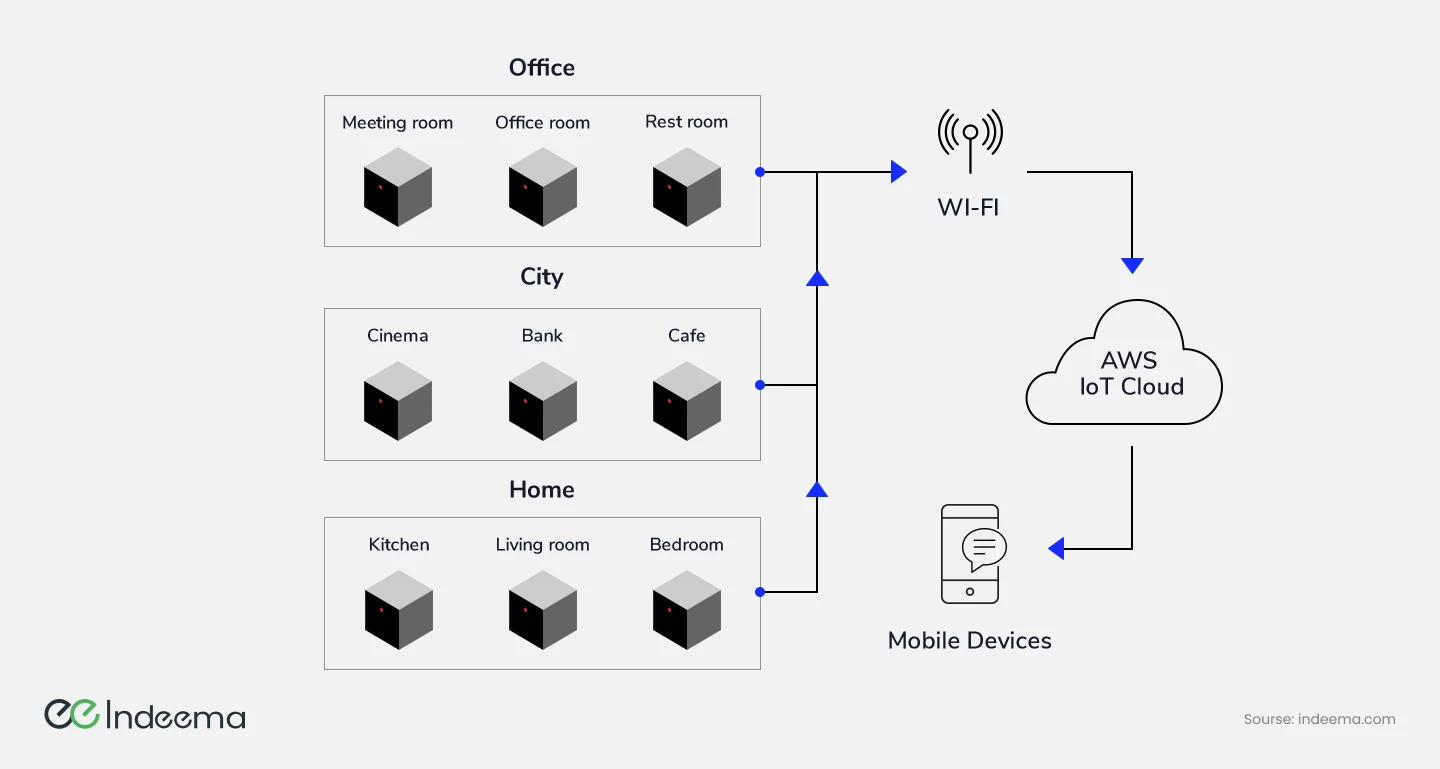
Because every device follows the same path to the cloud, one account can cover sensors in many places, such as a meeting room, a café and a bedroom, and see them in one list.
What was hard
- Making set-up simple. Connecting the device to the app and to Wi-Fi, and choosing acceptable ranges, had to work for people who never read a manual.
- Hardware that looks right and measures right. The device had to look good on a desk and still work as a measuring instrument, which took several rounds of materials and design.
- Precise and timely readings. The team tested the device in different environments and conditions before launch to find drift and timing problems early.
- A clear app experience. Each value had to be readable at a glance, with detail one tap away.
- Notifications tied to the right device. Alerts had to be bound to a specific device and user, and fire only when a value crossed the user's own threshold.
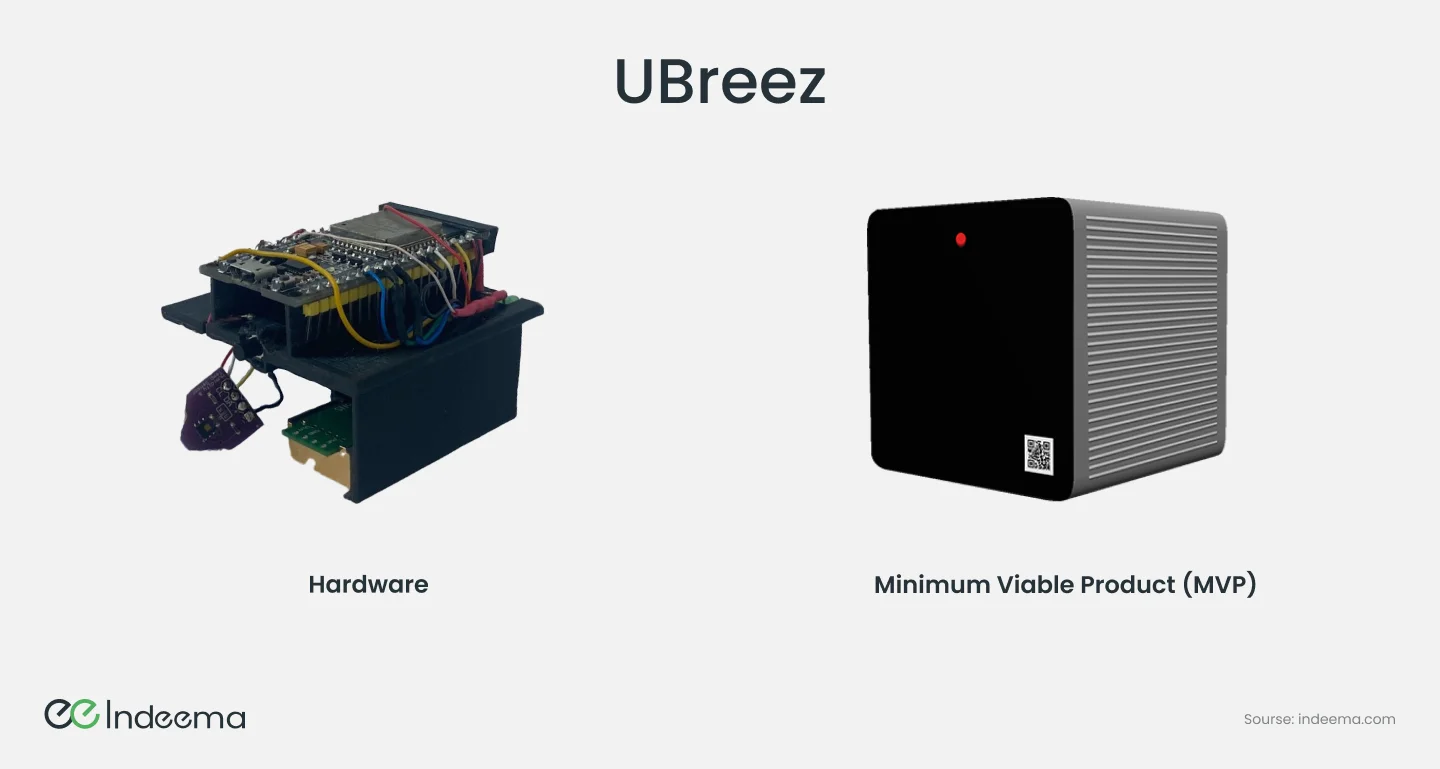
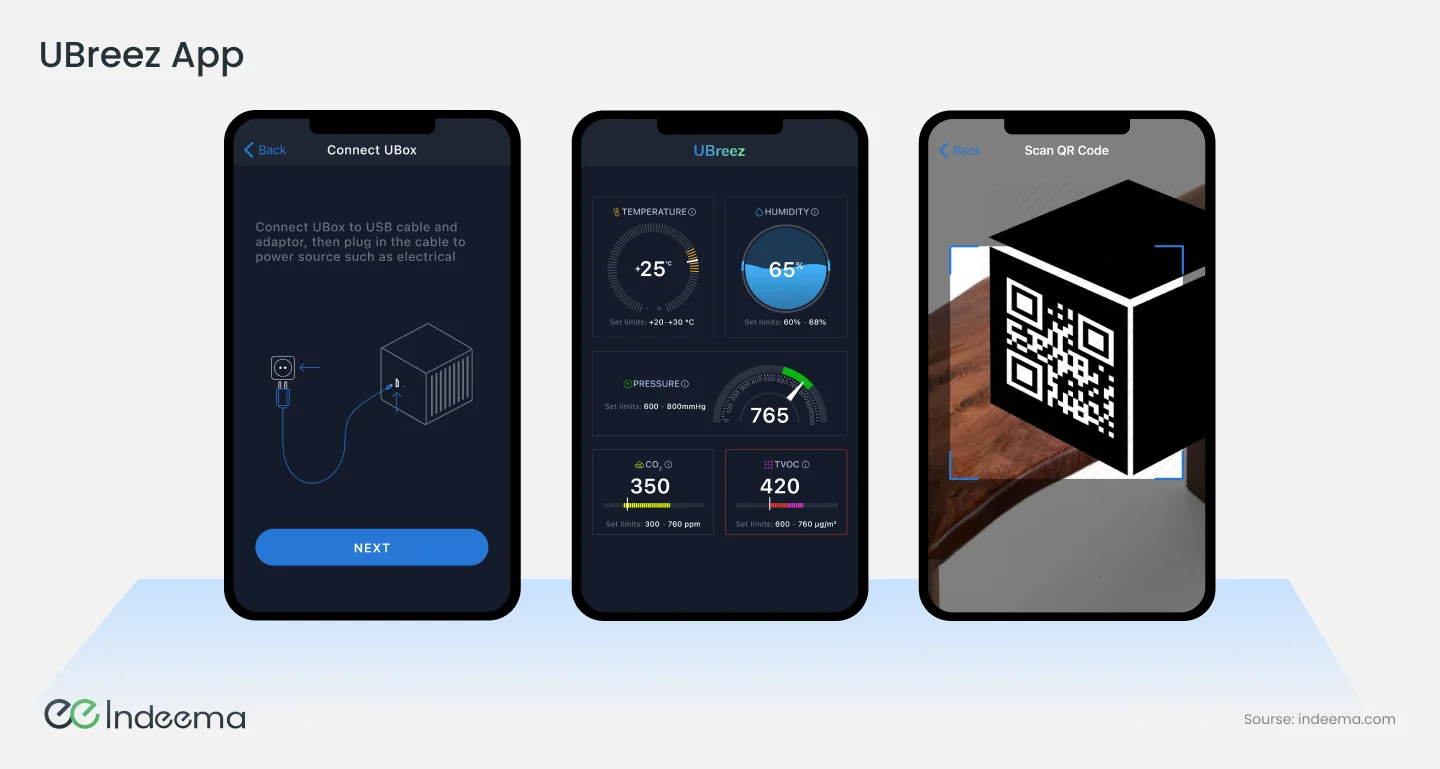
Each component went through functional, integration and system testing, followed by user testing after release. Ongoing work then covered bug fixes, app updates and security patches, which is the normal life of a connected product rather than an exception.
Engineering trade-offs
Direct Bluetooth LE vs cloud-connected app
- You gain
- Direct BLE needs no account, works offline and keeps data on the phone.
- You pay
- There is no remote access or alerting unless the phone or a hub relays to the cloud.
- Choose it when
- BLE for personal devices used nearby; cloud when users expect remote control, alerts or shared access.
Push alerts from the back end vs app polling
- You gain
- Push alerts arrive with the app closed and save phone battery.
- You pay
- Thresholds and notification logic must live in the back end, per device and per user.
- Choose it when
- Use push for anything a user must not miss; polling only for screens that are already open.
Managed cloud services vs custom servers
- You gain
- Managed services such as serverless functions and managed databases reduce operations work and scale with the fleet.
- You pay
- They tie cost and architecture to one provider's model.
- Choose it when
- Start managed for a new product; revisit when scale or cost makes a custom layer worthwhile.
Decision matrix: choosing the device-to-app path
Start from where the device lives and what powers it; the connection pattern follows.
| Device | Best connection | Set-up flow | Remote access | Main risk |
|---|---|---|---|---|
| Wearable or personal health device | Bluetooth LE to the phone | Pair in the app | Through the phone's own connection | Data gaps when the phone is away |
| Mains-powered home or office device | Wi-Fi to a cloud platform | BLE or QR code to pass Wi-Fi credentials | Native, through the cloud | Router changes and failed onboarding |
| Battery sensor in a home mesh | Zigbee or Thread through a hub | Add to the hub, often via Matter | Through the hub's cloud link | Hub dependency and ecosystem compatibility |
| Device far from any home network | Cellular to cloud | Scan to claim; connectivity is built in | Native, through the cloud | Data cost and coverage |
Decision rule: Fix the connection pattern before the screens: it decides onboarding, offline behaviour and what the app can promise. Use Bluetooth LE for set-up almost everywhere, even when everyday traffic goes through the cloud.
Common mistakes
Designing screens before choosing the connection
The app promises remote control or instant updates the device cannot deliver.
Instead: Decide the device-to-app path first, then design what the app can honestly show.
Treating onboarding as a single screen
Users fail at Wi-Fi set-up and return the device.
Instead: Design and test provisioning as its own flow, with recovery for wrong passwords and lost connections.
Showing the requested state instead of the real one
The app says a device is on when the command never arrived.
Instead: Update the screen from the device's reported state, with a visible pending state in between.
Leaving firmware updates out of the app design
Updates fail silently or interrupt users at the wrong moment.
Instead: Give updates clear progress, failure and rollback states in the app.
Where we've built this
The UBreez case covers the project in more depth: the starting point, how the device, cloud and app were built together, and what was delivered.
Case studyIndoor environment monitor with device, cloud and mobile appThe full story of the air-quality product described here: device, cloud platform and mobile app built together, with set-up and alerts as the hard parts.Was this useful?
Where this shows up in our work
ExpertiseApplication engineering for the people who use connected productsDesigning onboarding, live status, alerts and control around a real device-to-app path is the application engineering work we do for connected products.For how these app patterns change when the product is sold to consumers at scale, see Connected consumer products.
Apply this to your product