


Insights / Smart Energy
How We Built an IoT System for Managing Household Solar Energy
The architecture behind Solar Manager: a device in the home, a cloud platform that configures it, role-based dashboards, and the data decisions that kept it fast.

The short answer
An IoT system for managing household solar energy has two halves. A device in the home reads production, consumption and storage and switches appliances; a cloud platform holds each home's configuration, stores the readings and serves dashboards to homeowners, installers and OEM partners. For Solar Manager we built the firmware and software around hardware the client had already designed. The hard parts were not the charts. They were a configuration model that fits every household, minute-level data that stays fast to display, and energy calculations that add up.
Key takeaways
- Define each home's configuration in the cloud and let the device retrieve it; households differ too much for one fixed setup.
- Collect at minute resolution, but store and serve it through a time-series database, downsampling and caching.
- Check that the energy balance closes before anyone trusts the dashboard: production, consumption, import and export must agree.
- Design roles early: homeowners, apartment sub-users, installers and OEM partners each need a different view of the same data.
Why a home solar system needs a management layer
A photovoltaic (PV) system on a single-family home or a small apartment building produces most of its energy in the middle of the day, when the household often uses little. Without visibility and control, that energy goes to the grid while appliances run later on grid power. Optimising self-consumption, using more of your own production at home, is what makes a home solar investment pay back.
Solar Manager is a product built around that goal. It shows homeowners what happens to the energy their panels produce and lets them act on it. A Solar Manager user should be able to answer three questions at a glance:
- Is any device using more energy than it should?
- Would more solar modules pay off?
- Where does the energy go when the house is not using it?
- Self-consumption
- The share of a PV system's own production that is used on site, directly or through a battery, instead of being exported to the grid.
Where the project started
Solar Manager had already developed the hardware before we started working together. What it lacked was the firmware and software that would connect the device to the people using it. The product brief was a platform that lets homeowners monitor electricity production and consumption in real time, including from a tablet mounted on the wall, and lets installers set up and control the solar infrastructure.
Before writing code, the team framed the work as five questions:
- How should the data be gathered?
- How should it be presented to end users?
- How do we make it clear enough that every homeowner understands what the system is saying?
- How do we make a dashboard simple enough to control solar energy use from it?
- How do we protect privacy and the household's data?
The architecture: a device in the house, a platform in the cloud
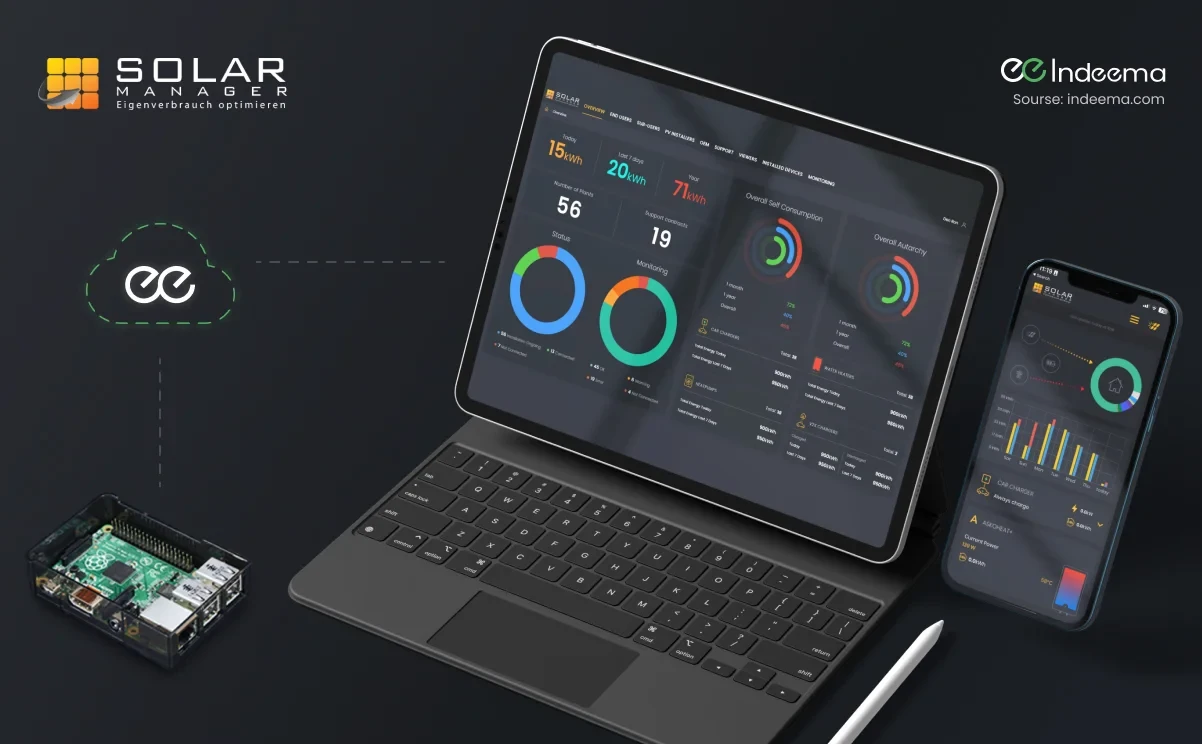
The system has two parts: the Device installed in the house, and the Cloud, which includes an IoT platform for managing the devices. The device works with Raspberry Pi based hardware and interfaces with the household's energy equipment and appliances.
- ConfigureThe home's configuration, which depends on the appliances present, is defined in the cloud.
- RetrieveThe device fetches that configuration so it knows how to interface with this particular household.
- MeasureThe device reads production, consumption and storage, and sensors report every minute.
- Store and computeThe cloud stores readings in a time-series database and calculates trends, totals and forecasts.
- PresentWeb, tablet and mobile apps show each role the data it is allowed to see.
- ActUsers set active hours, limits and how solar energy is distributed; the device switches appliances accordingly.
Configuration flows down from the cloud and measurements flow up, so one device design can serve very different households.
Device management covers the rest of the life cycle. Firmware is updated over the air and can be triggered from the user interface when a new version is available. For on-site configuration, the device also accepts a PC connection over USB.
One data set, many roles
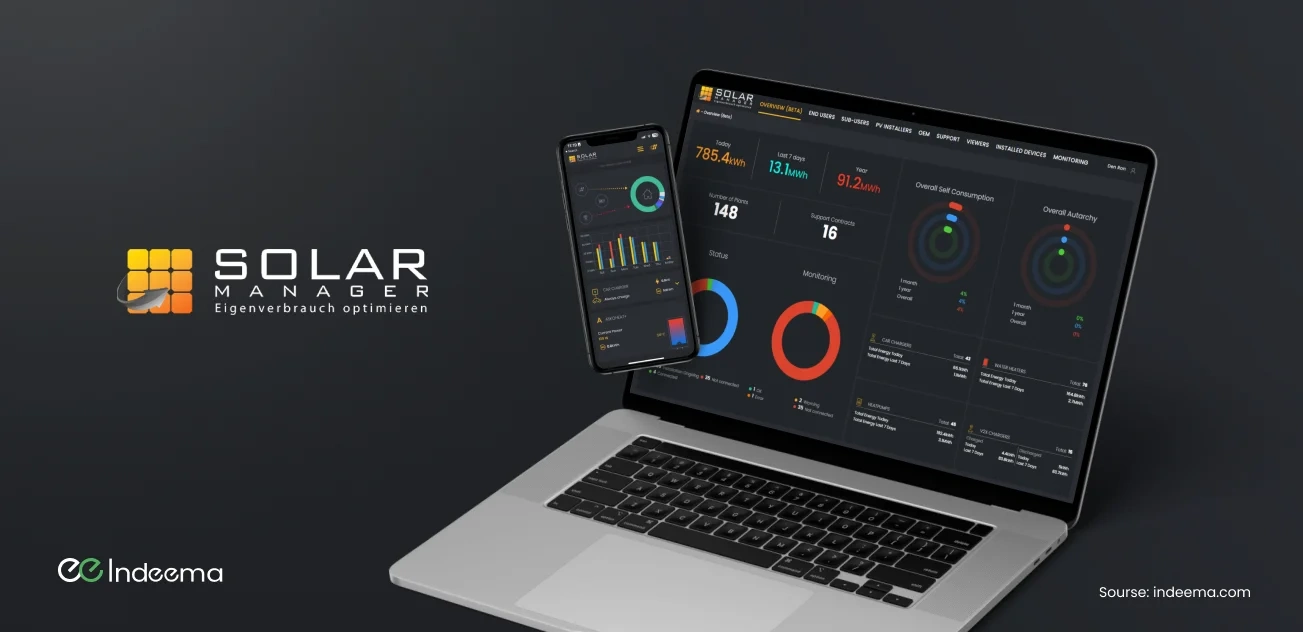
The platform was designed for a growing base of households, so access control was part of the architecture from the start. Each homeowner has a personal login to their own production and consumption data. Administrators see an overview across all users. PV installation companies get dedicated access to the systems they installed.
| Role | What they work with |
|---|---|
| End user (homeowner) | Their own production, consumption, history and device controls |
| Sub-user | Individual access within an apartment building |
| Viewer | Read access to a system without control |
| Installer | The PV systems their company has installed, for set-up and support |
| Employee / admin | An overview across users for support and operations |
| OEM partner | Own-branded mobile apps on top of the same platform |
OEM support had a large effect on the scope. Besides the main app, the team designed and built ten mobile applications for OEM roles, each aligned with the partner's corporate style, all running on one back end.
What the homeowner sees and controls
The design started with wireframes and a prototype that showed the platform's flow. It then moved to the web platform, the wall tablet and the mobile apps. Each step was confirmed with the client. The principle throughout was that useful information is grouped and visually highlighted, so a homeowner who knows nothing about inverters can still read it.
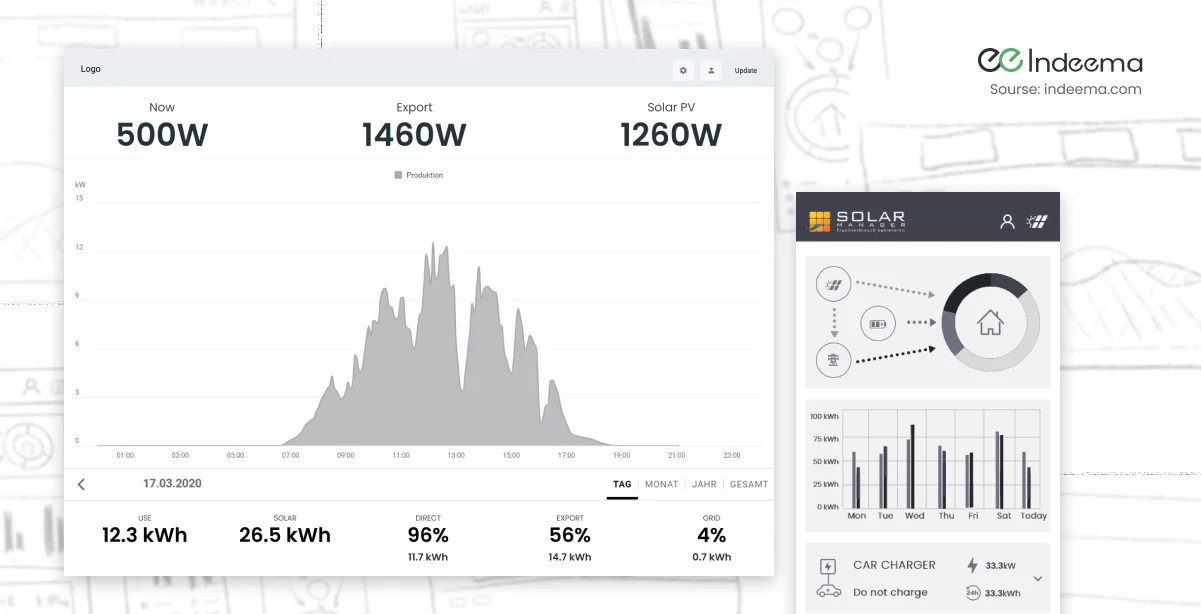
- Quick connection: each device connects to the service through its firmware with little set-up.
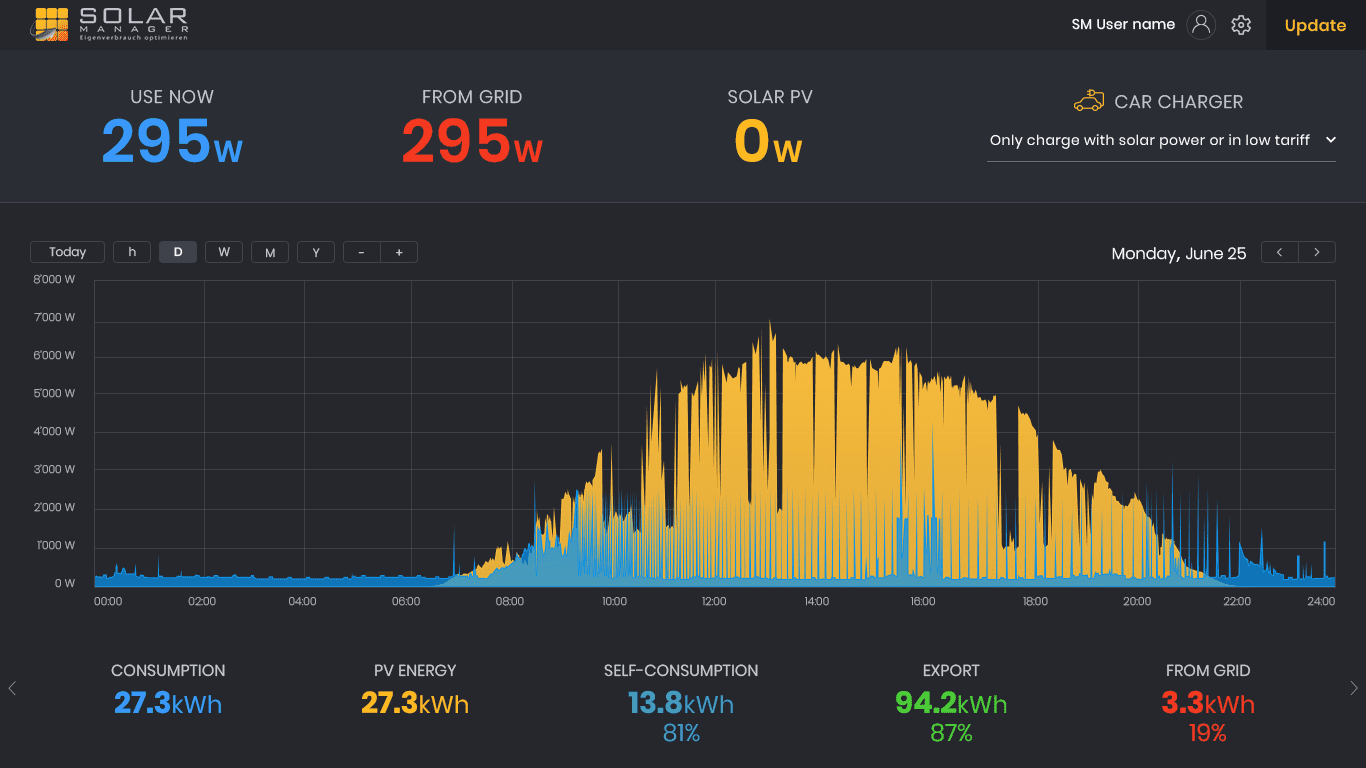
- Live energy flow: the app shows how electricity from the panels is distributed between the grid, the battery and individual devices.
- Energy trends: consumption, production, export and import, with daily and yearly statistics and history kept from the first day of use.
- Energy use management: active hours, consumption limits and rules for how solar energy is distributed, plus widgets to connect and disconnect devices.
- Forecasting: a forecasting service helps users prioritise solar energy for the devices in their home.
- Error monitoring: faults are tracked so that support and installers can respond.
The platform also includes a payment system built on a local payment provider that was little known to development teams outside its home market.
Three data problems and how we solved them
1. Detailed graphs across every time range
Users needed graphs for an hour, a day, a week and longer, all with meaningful detail. We set the sensors to report every minute and compiled the data on the back end, so every range is built from the same source.
2. Keeping the dashboard fast as data grows
Minute-level data from many households quickly becomes too much to process and render on demand. The fix had four parts: a time-series database (TSDB), cache layers in front of it, downsampling of the inbound stream for longer ranges, and archiving of old, rarely used data. Archiving also cut disk usage and the cost of storing each user's history per year.
3. Energy figures that did not add up
Early consumption estimates did not match. The team analysed the calculation end to end and corrected the formulas, so that consumed energy is calculated accurately and consistently.
How the work was sequenced
- R&D: wireframes of the platform flow and a prototype of the key features.
- Specification: project planning, MVP priorities and the technical specification for later phases.
- Development: back end and front end, data storage, user management and security, built to scale with more users and devices.
- DevOps and cloud: cloud infrastructure, automated deployments for frequent updates, and monitoring and logging to catch issues early.
- Testing: functional and performance testing against the user stories and acceptance criteria before release.
The team combined web (front end and back end), iOS and Android, embedded, UX/UI, QA and project management. A home energy product touches all of these, and the interfaces between them, such as firmware to cloud and cloud to app, are where most of the risk sits.
Engineering trade-offs
Raw minute data vs downsampled storage
- You gain
- Keeping every reading gives maximum detail for diagnostics and recalculation.
- You pay
- Storage cost and query time grow with every household and every month of history.
- Choose it when
- Keep recent data at full resolution; downsample and archive older ranges, and cache the views users open most.
Configuration in the cloud vs on the device
- You gain
- Cloud-defined configuration lets one firmware build serve every household and lets support change a set-up remotely.
- You pay
- The device depends on retrieving its configuration and must handle a missing or invalid one safely.
- Choose it when
- Use cloud configuration when household set-ups vary widely; cache the last valid configuration on the device.
One branded app vs OEM variants
- You gain
- OEM apps let partners sell the product under their own brand and widen distribution.
- You pay
- Every variant multiplies design, release and QA effort.
- Choose it when
- Offer OEM variants only on a shared code base and back end, with branding as configuration.
Before you build a home energy platform
Questions worth settling before the first sprint:
- List the equipment each household may have and decide how that mix is described as configuration.
- Choose the sampling interval from the graphs and calculations you need, then plan downsampling and retention.
- Write down the energy-balance identities your data must satisfy and test them automatically.
- Map every role, from homeowner to installer to OEM, and what each may see and change.
- Plan over-the-air firmware updates and a local configuration path for installers.
- Decide what the device must keep doing if the cloud is unreachable.
Where we've built this
This article goes deeper into the engineering decisions behind that work: the device and cloud split, the role model and how minute-level data was kept fast to display.
Case studyA web service for monitoring and configuring residential solar systemsThe case study summarises the same solar energy management platform: firmware, web service, user roles and real-time energy trends for European households and installers.Was this useful?
Where this shows up in our work
SolutionSmart Energy OperationsConnecting home or site energy equipment to a cloud platform, with dashboards, control rules and installer tools, is the system our smart energy work is built around.For what changes when the same ideas move from one home to solar and wind assets at scale, see Connected systems for solar and wind energy.
First published
Apply this to your product