Insights / Industrial IoT
What Is SCADA and How Does It Work?
What a SCADA system is made of, how data and commands move through it, how it evolved to web and IoT SCADA, and what to decide before modernising one.

The short answer
SCADA (supervisory control and data acquisition) is the layer that lets operators watch and steer industrial processes spread over a plant or a whole region. Field devices, RTUs and PLCs, read sensors and run fast local control. A communication network carries their data to central servers. HMIs show the process to people and send their commands back. SCADA supervises: the time-critical control loop stays in the PLC, while SCADA collects, stores, alarms and lets a person intervene.
Key takeaways
- SCADA supervises; PLCs control. Keep safety and fast loops in the field controller, not in the central software.
- The communication layer usually decides what is possible: polling rates, bandwidth and what happens during a link outage.
- Web and IoT SCADA add remote access and analytics, and with them a much larger attack surface to design for.
- Most modernisation adds a data layer beside existing SCADA rather than replacing controllers that already work.
Why supervisory control matters
Operators cannot manage what they cannot see. Pipelines, water networks, power distribution and production lines spread equipment over distances no one can walk every shift. Without a supervisory layer, someone has to visit each site to read a gauge, and a fault is found when it has already caused damage.
SCADA closes that gap. It turns thousands of field readings into one live picture, raises an alarm when a value leaves its safe range, and lets a person act from a control room instead of a truck. The engineering question is rarely whether to have SCADA. It is how the field, the network and the software should divide the work.
- SCADA
- Supervisory control and data acquisition: a system architecture that gathers data from distributed field devices, presents it to operators and sends supervisory commands back. Fast, deterministic control stays in the field controllers.
SCADA architecture: the four core components
SCADA is not one software tool. It is a layered system that bridges physical equipment and the applications people use.

Remote terminal units (RTUs)
An RTU is a ruggedised, microprocessor-based unit at a remote site. It reads analog and digital signals from sensors, such as pressure, temperature, flow or a valve position, converts them into data the system can use, and reports them upstream. RTUs are built for sites with poor power and intermittent links, so they typically buffer data and timestamp events locally.
Programmable logic controllers (PLCs)
A PLC provides real-time automated control for fast processes. It runs a deterministic scan cycle: read inputs, execute control logic, write outputs, repeat. Interlocks and emergency stops belong here, because they must work whether or not the central system or the network is available. In practice the line between RTU and PLC has blurred; many sites use PLCs with communication modules in both roles.
Human-machine interfaces (HMIs)
The HMI is the visual layer. It turns process data into mimic diagrams, trends, alarm lists and controls, so an operator can see the state of a line or a network and intervene. An HMI can be a panel next to one machine or a set of screens in a control room that covers many sites.
Communication infrastructure
The network carries readings up and commands down. It can be fibre, Ethernet, licensed radio, cellular or satellite, often mixed within one system. Whatever the medium, the protocols must tolerate delay and loss, and the links must be secured, because they are a direct path to physical equipment.
| Component | Main job | Where it sits | If it fails |
|---|---|---|---|
| RTU | Acquire field signals and report them | Remote site, often unattended | The site goes dark to operators; local buffering limits data loss |
| PLC | Deterministic local control and interlocks | Next to the machine or process | The process stops or falls back to its safe state |
| HMI | Show the process and accept operator commands | At the machine or in a control room | Operators lose visibility; control loops keep running |
| Communication network | Move data and commands between field and centre | Between sites and servers | Data arrives late or not at all; alarms may be missed |
| SCADA servers and historian | Poll devices, raise alarms, store history | Control centre or cloud | No central alarms, trends or reports |
How a SCADA system works, step by step
- SenseField sensors measure pressure, flow, level, temperature or equipment state.
- Acquire and controlThe RTU or PLC digitises the signal and runs any local control logic.
- TransmitData travels over radio, cellular, satellite or fibre, by polling or report-by-exception.
- SuperviseSCADA servers check values against limits, raise alarms and write history.
- Visualise and actThe HMI shows the state; an operator acknowledges alarms or sends a setpoint back down.
Sense, acquire and control repeat in the field controller whether or not the network or central servers are available.
Two patterns move the data. In polling, the master asks each device for its values on a schedule. In report-by-exception, a device sends data only when a value changes beyond a threshold. Polling is predictable; report-by-exception uses far less bandwidth, which matters on cellular and satellite links.
The protocols are a mix of old and new. Modbus remains common at device level. DNP3 and IEC 60870-5-104 are widely used in utilities because they carry timestamps and handle unreliable links. OPC UA connects SCADA to plant software, and MQTT is often used to move SCADA data into IoT and cloud platforms.
HMI vs SCADA: what is the difference?
The two terms are often used together, and they are not the same thing. An HMI is one component: a screen through which a person sees and operates a process. SCADA is the whole system around it, including data acquisition from many devices, communication, alarms, history and supervisory control across sites.
| Aspect | HMI | SCADA |
|---|---|---|
| Scope | One machine, cell or line | Many devices and sites |
| Data | Mostly live values | Live values, alarms, history and reports |
| Control | Local operator actions | Supervisory commands across the system |
| Typical form | Panel or touch screen at the equipment | Servers, historian and control-room or web clients |
A PLC can run without an HMI or SCADA: it keeps executing its program. What is lost is visibility and the ability for a person to intervene remotely.
Where SCADA is used
- Energy: generation and distribution assets spread over large areas report to a central control room, where operators reroute power and respond to faults.
- Water and wastewater: pump stations, reservoirs and treatment steps such as chemical dosing run continuously and are supervised remotely.
- Manufacturing: line and machine data reach one control room, so operators spot bottlenecks, quality drift and emergencies early.
- Oil and gas: wellheads, tanks and pipelines report pressure, flow and level from remote locations, often over cellular or satellite links.
- Transport: traffic signals, signs and roadside sensors feed regional traffic management centres.

Types of SCADA systems: from monolithic to IoT
Architectures evolved in generations. Most real installations mix them, which is why modernisation is mostly an integration problem.
| Generation | How it works | What it added | Constraint today |
|---|---|---|---|
| Monolithic | Self-contained mainframe or server with proprietary protocols | Central supervision of remote sites | No interoperability; data locked in one vendor's system |
| Distributed | Control functions spread across stations on a local network | Local redundancy and faster response | History and data are fragmented across stations |
| Networked | Systems connected over WAN and standard IP protocols | Multi-site operation and open protocols | Exposure to IT-style network threats |
| Web-based | Operators use a browser instead of an installed client | Remote access from any approved device | Needs strong identity, access control and segmentation |
| IoT SCADA | Edge devices and gateways feed a cloud or central data platform | Fleet-wide analytics, cheaper connectivity for small sites | Data ownership, latency and keeping control decisions local |
What SCADA changes for operations
- From reactive to planned maintenance: logged deviations in pressure, temperature or run time show an asset degrading before it fails, so repairs can be scheduled.
- Fewer manual readings: data arrives automatically, so technicians no longer drive to sites only to copy numbers, and transcription errors disappear from the record.
- Faster response to unsafe conditions: alarms fire the moment a value leaves its limits, and automated shutdown logic in the field isolates the problem.
None of this comes automatically. Alarm limits that are too tight flood operators with noise; history that no one reviews prevents nothing. The value depends on choosing the right signals, sensible limits and a clear owner for each alarm.
Building IoT monitoring software for SCADA: the VikingSCADA project
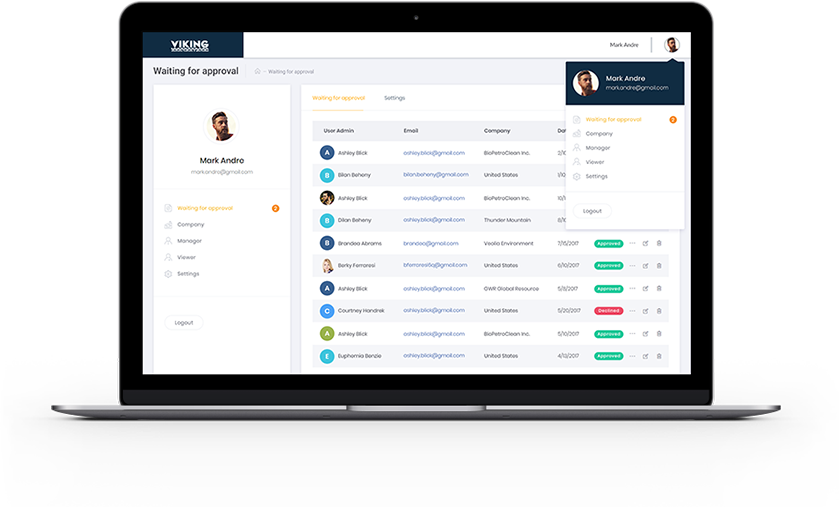
VikingSCADA provides monitoring for industrial equipment at remote oil, water and gas sites. Before the project, readings depended on manual tracking: technicians drove long distances to wellheads and processing stations to copy values from local control modules.
- Travel time and cost: field staff spent hours driving between remote sites.
- Data quality: manual notes introduced transcription errors into the historical record.
- Late detection: data was reviewed only periodically, so a malfunction could go unnoticed for days.
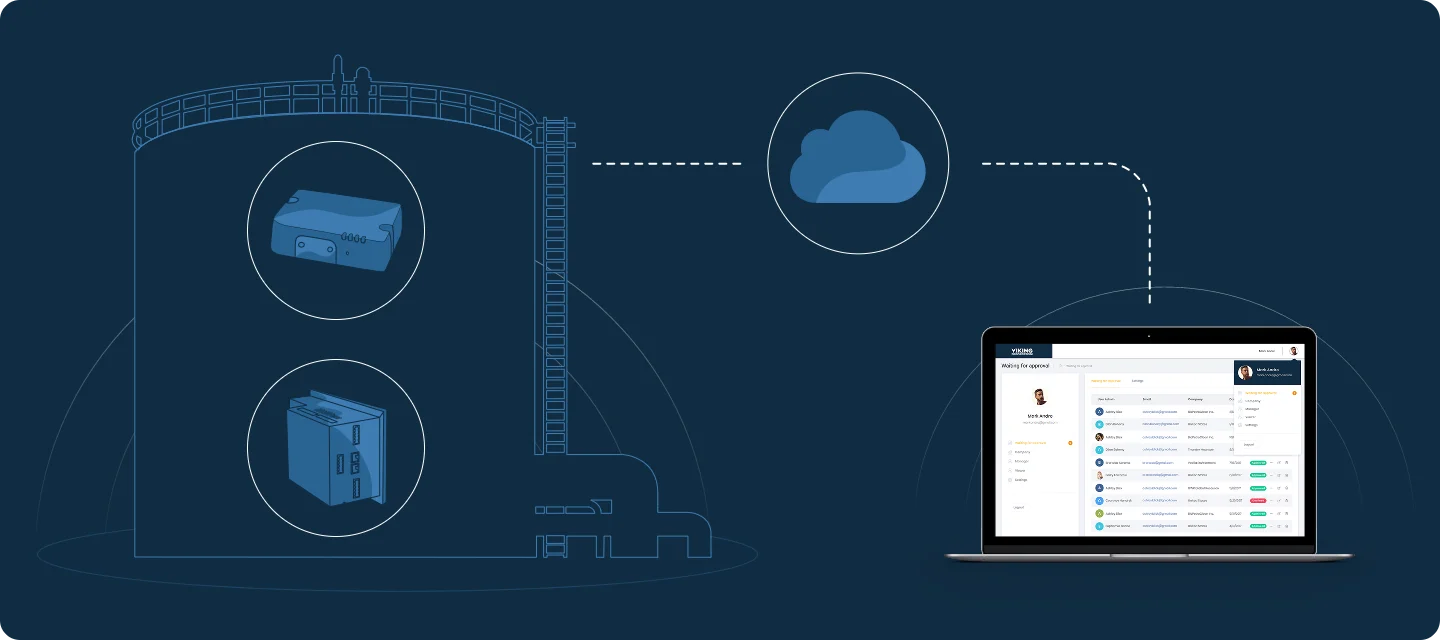
Indeema built a web-based IoT SCADA monitoring platform that captures and stores operational data from remote client sites. The ingestion layer was designed for SCADA traffic over low-bandwidth cellular and satellite connections. Network segmentation and strict access control keep the cloud interface separated from the field equipment.

- Automated data collection replaces routine site visits made only to take readings.
- Automated logging records process values without manual transcription.
- Real-time alarms notify field personnel as soon as an equipment value leaves its safe range.
Security: the cost of connecting SCADA
Classic SCADA relied on isolation. Every web client, cloud link and remote-access path removes some of it. Many field protocols were designed without authentication, so a network path to a controller can be a path to the physical process.
Baseline controls for a connected SCADA system
- Segment the network into zones, with controlled conduits between field, control and enterprise networks.
- Prefer outbound-only connections from the site to the cloud; avoid exposing field devices to inbound traffic.
- Give every user and device its own identity, with role-based access and multi-factor authentication for remote users.
- Encrypt links that leave the site, and use the secure variants of protocols where the equipment supports them.
- Log access and commands, and review them; patch servers and gateways on a planned schedule.
- Use an established framework such as ISA/IEC 62443 to structure requirements.
Engineering trade-offs
On-premises SCADA vs web or cloud SCADA
- You gain
- On-premises keeps data and control inside the plant network with predictable latency; web and cloud give remote access and multi-site analytics without installed clients.
- You pay
- On-premises makes fleet-wide visibility and remote work harder; web and cloud widen the attack surface and depend on links leaving the site.
- Choose it when
- Keep control and safety on-premises; use web or cloud for monitoring, history and analytics across sites.
Polling vs report-by-exception
- You gain
- Polling gives predictable timing and an easy health check; report-by-exception sends only changes and saves bandwidth.
- You pay
- Polling wastes bandwidth on unchanged values; report-by-exception needs heartbeats to tell a quiet device from a dead one.
- Choose it when
- Poll on fast, cheap networks; use report-by-exception with heartbeats over cellular and satellite links.
Replace the SCADA vs add an IoT data layer
- You gain
- Replacement can remove proprietary limits; a data layer beside existing SCADA delivers new visibility without touching working control.
- You pay
- Replacement risks downtime and requalification; a data layer leaves old constraints in place and adds another system to maintain.
- Choose it when
- Add a data layer first; replace components when support, security or interoperability make the old system untenable.
Choosing a monitoring architecture for distributed sites
Start from what the sites already have and how they connect; the platform follows from those constraints.
| Device | Fits when | Connectivity | Where control runs | Main risk |
|---|---|---|---|---|
| Classic on-premises SCADA | One plant or a private network to every site | Private fibre, Ethernet or licensed radio | PLCs, supervised from a local control room | Limited remote access and siloed data |
| Web SCADA | Operators and managers need access from many places | Site links plus secure internet access for users | PLCs; supervision through the browser | Weak identity or access control |
| IoT monitoring layer on existing SCADA | Many small remote sites, or analytics across the fleet | Cellular or satellite through edge gateways | PLCs and RTUs; the cloud only monitors and alerts | Link outages and data gaps if buffering is not designed in |
Decision rule: Keep control in the field, choose the transport for the worst site rather than the best, and add cloud monitoring as a layer that tolerates lost links.
Before you modernise a SCADA system
A short review that turns a modernisation idea into requirements:
- Inventory field devices, protocols and firmware versions at every site.
- Measure the real bandwidth, latency and outage pattern of each site link.
- List the signals and alarms operators actually use, and who owns each alarm.
- Decide which functions must keep working when the central system or cloud is unreachable.
- Define buffering and backfill so data recorded during an outage is not lost.
- Agree the security zones and remote-access model before choosing a platform.
Common mistakes
Moving control logic into the cloud
A link outage or latency spike turns into a process upset or a safety issue.
Instead: Keep control and interlocks in PLCs; use the cloud for supervision, history and analytics.
Designing for the best-connected site
Remote sites on cellular or satellite links drop data or flood the link.
Instead: Size polling, payloads and buffering for the worst link in the fleet.
Exposing field devices for remote access
Unauthenticated field protocols become reachable from outside the plant.
Instead: Use segmented zones, outbound-only gateways and per-user access through a managed entry point.
Alarming on everything
Operators learn to ignore alarms, including the one that matters.
Instead: Rationalise alarms: clear limits, priorities and an owner for each.
Where we've built this
The VikingSCADA platform above is described in full in the case study: what the client already had, why low-bandwidth remote sites made it difficult, and how the web application was built.
Case studyExtending a SCADA product with cloud monitoring and gateway updatesA web IIoT application that collects and stores data from SCADA units at remote oil, water and gas sites and alerts personnel when values leave safe limits.Questions engineers ask
How does a SCADA system work?
Sensors measure the process, RTUs and PLCs digitise the signals and run local control, a communication network carries the data to central servers, and the servers raise alarms and store history. Operators see the process on HMIs and send supervisory commands back down.
What is the difference between SCADA and HMI?
An HMI is the screen through which a person sees and operates a process. SCADA is the full system around it: data acquisition from many devices, communication, alarms, history and supervisory control across sites.
Is SCADA a software?
SCADA usually refers to the whole system, including field devices, networks and servers. The SCADA software is the supervisory part: device communication, alarming, history and HMI screens.
Can a PLC function without HMI or SCADA?
Yes. A PLC keeps executing its control program on its own. Without an HMI or SCADA, operators lose visibility, alarms and remote intervention, but the local control loop continues.
Was this useful?
Where this shows up in our work
SolutionIndustrial IoT & IntelligenceWhen the question is how to connect existing SCADA and field equipment to a monitoring and analytics platform without disturbing control, that is our industrial IoT work.For remote wellheads, tanks and pipelines, where links are thin and sites are unattended, see Oil & Gas.
Apply this to your product
Review your platform architecture
Sources
- ISA – ISA/IEC 62443 series of standards accessed 1 October 2026