


Insights / Hardware & Electronics
Types of Computer Memory: SRAM, DRAM, Flash and What Embedded Devices Use
Volatile and non-volatile memory, how SRAM, DRAM and flash work, the storage media around them, and how an embedded device's memory map is chosen.

The short answer
Computer memory falls into two groups. Volatile memory loses its contents without power and is used for working data: SRAM (fast, used for caches and microcontroller RAM) and DRAM (dense, used as main memory). Non-volatile memory keeps data without power: flash and EEPROM in semiconductor form, plus magnetic disks, optical discs and tape for storage. Embedded and IoT devices combine them on a small scale: code in flash, working data in SRAM, settings in EEPROM or a reserved flash area, and external flash or DRAM only when the firmware, logs or operating system need more.
How memory is classified
Computing systems use several kinds of memory at once because no single technology is fast, dense, cheap, durable and power-free at the same time. Two questions place any memory type: does it keep data without power, and where does it sit between the processor and long-term storage?
| Type | Keeps data without power? | Relative speed | Typical role |
|---|---|---|---|
| SRAM | No | Fastest | Processor caches, microcontroller RAM, buffers |
| DRAM | No | Fast | Main memory in computers, phones and Linux-class devices |
| Flash (NOR and NAND) | Yes | Fast to read, slow to erase and write | Firmware, SSDs, memory cards, embedded storage |
| EEPROM | Yes | Slow writes, byte-addressable | Small settings and calibration data |
| Magnetic disk (HDD) | Yes | Slow, mechanical access | Bulk storage in servers and network storage |
| Optical disc and tape | Yes | Slowest | Distribution of media, archives and backups |
Semiconductor memories are usually called random-access memory because every cell can be reached in the same time, unlike a disk, which has to spin to the right track. Strictly, flash is random-access for reads too, but the term RAM is normally reserved for volatile working memory.
Magnetic and optical storage
Magnetic recording writes data by changing the magnetisation of a coated disk or tape with a head that generates a magnetic field. Hard disk drives remain common in servers and network-attached storage because they are cheaper per gigabyte and tolerate frequent overwriting. Their moving heads and spinning platters bring noise, size, weight and sensitivity to shock, which is why they have disappeared from laptops and mobile devices. Tape survives where access time does not matter: archives and backups.
Optical discs store data as marks of different reflectivity, read with a laser and a photodiode. Writing is slow, so they are unsuited to working storage, but identical discs can be stamped in large numbers and last a long time. That keeps them in use for distributing video, music and games, alongside digital sales.
Volatile memory: SRAM and DRAM
Both are built from MOS transistors, organised as an array of cells selected by row and column address lines.
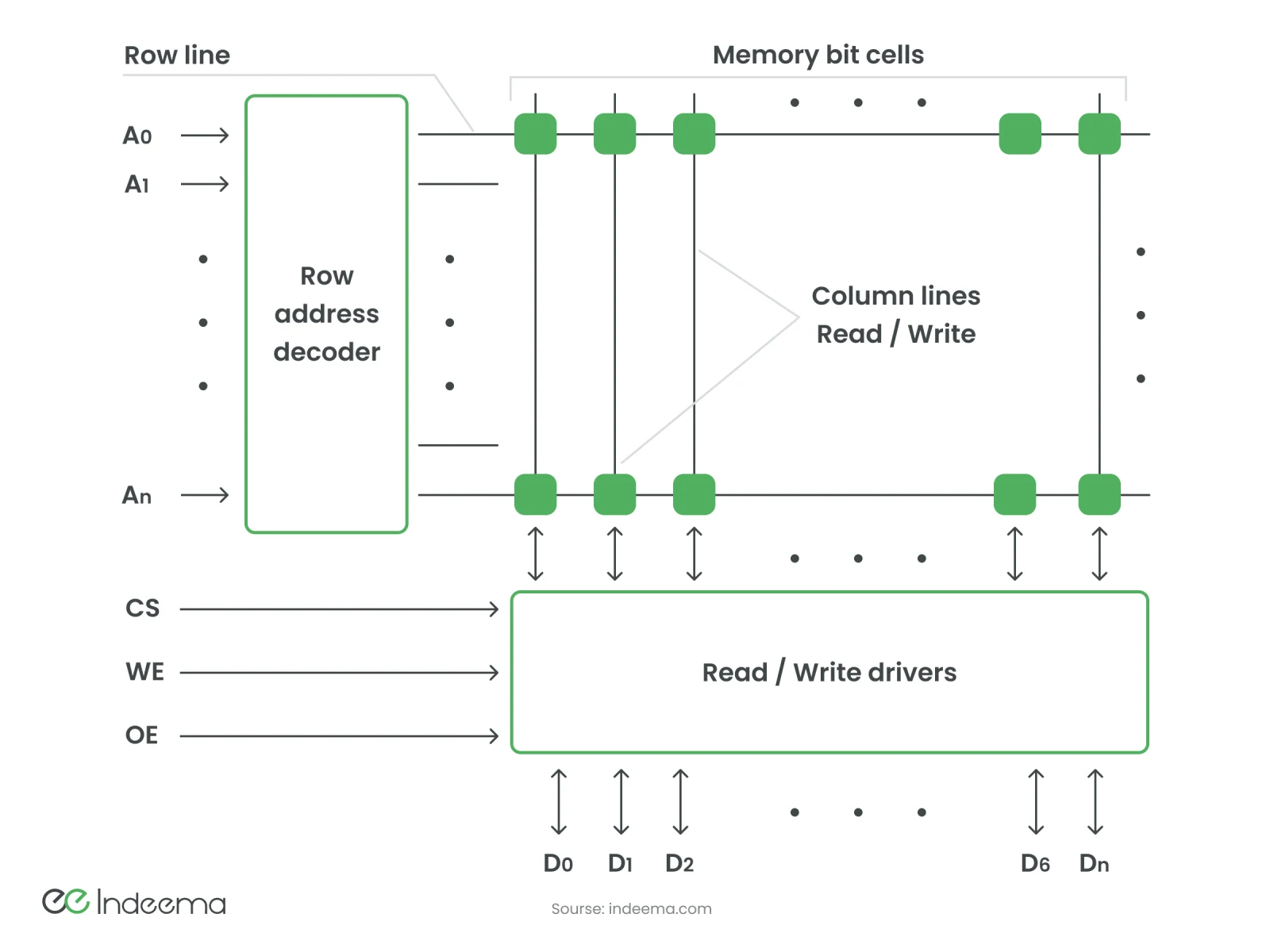
Static RAM (SRAM) stores each bit in a latch of cross-coupled inverters plus access transistors, usually six transistors per bit. It needs no refresh, switches fast and draws little power at rest, but the many transistors per bit make it expensive per byte. SRAM is used for processor caches, buffers in drives, routers and printers, and as the on-chip RAM of microcontrollers and FPGAs.
Dynamic RAM (DRAM) stores each bit as charge on a capacitor behind a single transistor, which allows very high density. The charge leaks, so every row must be refreshed periodically, which costs energy. DRAM chips are organised in rows, pages and banks and read a row at a time, so they need a memory controller; the delays between a command and the data are specified as timings such as CAS latency (CL). DRAM is the main memory of computers, servers, phones and single-board computers.
| Property | SRAM | DRAM |
|---|---|---|
| Cell | Latch of several transistors | One transistor and one capacitor |
| Refresh | Not needed while powered | Needed continuously |
| Access time | Shorter | Longer, plus controller latency |
| Density and cost per bit | Low density, high cost | High density, low cost |
| Power at rest | Low | Higher, because of refresh |
| Typical location | On the processor or microcontroller die | Separate chips or modules beside the processor |
Non-volatile memory: flash and its alternatives
Flash memory stores charge in a floating gate or charge-trap layer inside a MOS transistor, which shifts the transistor's threshold voltage. One level per cell stores one bit (SLC); more levels store two (MLC), three (TLC) or four (QLC) bits per cell, raising density but narrowing the margins between states. Modern NAND flash stacks hundreds of layers of cells vertically.
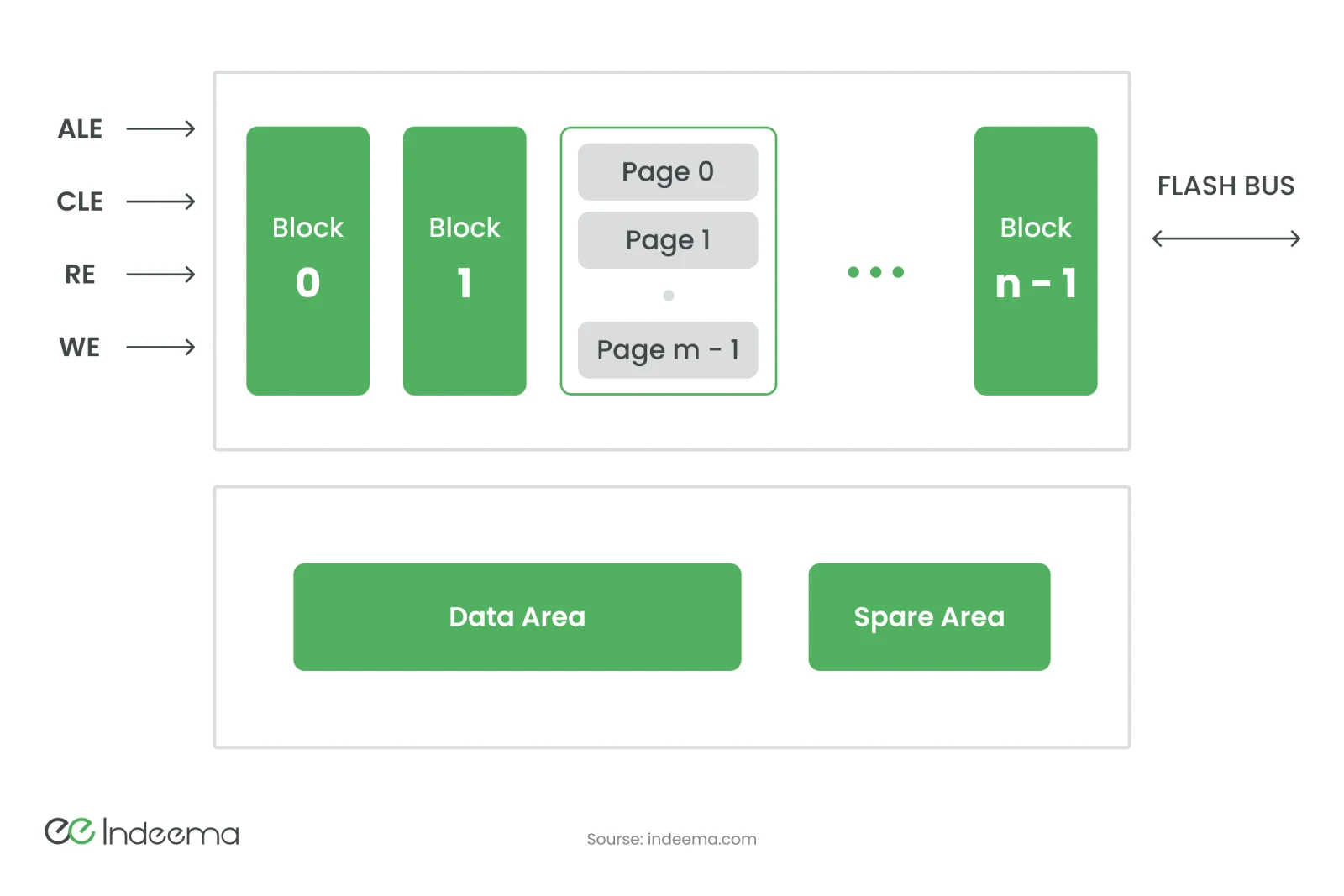
Flash has two properties every firmware engineer designs around. It can only be erased in whole blocks, so changing a few bytes means reading the block, erasing it and writing it back; erasing takes far longer than writing SRAM. And each erase wears the cells, so a block survives a limited number of program/erase cycles, fewer as bits per cell increase. Wear levelling, spare blocks and error correction exist to manage this.
- NOR flash can be read byte by byte and executed in place; it holds firmware in microcontrollers and in external serial flash chips.
- NAND flash is denser and cheaper per bit but read in pages; it is the basis of SSDs, memory cards, eMMC and the storage of Linux-class devices.
- EEPROM can be rewritten byte by byte, at small capacities, for settings and calibration values.
Several alternatives trade density for endurance or speed. FRAM (ferroelectric) and MRAM (magnetoresistive) write quickly with very high endurance and appear in some microcontrollers and standalone parts used for frequent logging. Phase-change memory switches a chalcogenide material between crystalline and amorphous states, and resistive RAM forms and breaks conductive filaments in a dielectric. Both have seen only limited commercial use so far.
Memory in an embedded or IoT device
A connected device uses the same building blocks on a much smaller scale, and the choice is made per job rather than per product.
| Memory | Holds | Watch out for |
|---|---|---|
| On-chip flash | Bootloader and application firmware | Room for a second image if updates must be fail-safe |
| On-chip SRAM | Stack, heap, buffers, radio stack state | Often the tightest constraint; contents lost in deep sleep unless retained |
| EEPROM or reserved data flash | Device identity, settings, calibration | Write endurance; corruption if power fails mid-write |
| External serial NOR flash | Update images, assets, larger firmware | Interface speed; execute-in-place support |
| NAND, eMMC or SD card | Logs, recorded data, a Linux file system | Wear and power-loss safety; SD cards are the weak point in many field devices |
| DRAM or PSRAM | Working memory for Linux, graphics, audio or ML models | Power draw and board complexity |
The engineering implication: memory decides how a device updates and survives
Memory is usually budgeted as a size, but the decisions that cause field failures are about behaviour. A device that must update itself safely needs space for a new image alongside the running one, or a recovery path. A device that logs often needs a memory and a file system that tolerate wear and sudden power loss. A device that sleeps to save power must decide which SRAM contents are retained and what is rebuilt on wake. Memory choice is one of the first decisions in IoT hardware development.
How to choose memory for an embedded device
Work through these before choosing parts
- Size code and working memory from a realistic build, including the radio and security stacks, then add margin.
- Decide the update strategy (dual image, recovery image or external staging) and size flash for it.
- Estimate write frequency for logs and settings and check the endurance of the chosen memory.
- Make every write safe against power loss: journalling file systems, atomic updates or FRAM for frequent writes.
- Decide what must survive deep sleep and whether the MCU can retain that SRAM.
- Add external flash or DRAM only when the firmware, data or operating system really needs it.
Questions engineers ask
How many types of computer memory are there?
Two broad groups: volatile memory (SRAM and DRAM), which loses data without power, and non-volatile memory, which keeps it. Non-volatile memory includes semiconductor flash and EEPROM as well as magnetic disks, optical discs and tape used for storage.
What is flash memory made of?
Arrays of MOS transistors with a floating gate or charge-trap layer that holds electric charge. The stored charge changes each transistor's threshold voltage, which represents one or more bits, and modern NAND stacks many layers of these cells.
Is RAM a semiconductor memory?
Yes. Both SRAM and DRAM are semiconductor memories built from MOS transistors, with DRAM also using a capacitor in each cell.
In embedded systems, what does cache memory mainly help with?
It reduces memory access latency. A small, fast SRAM cache holds recently used code and data so the processor waits less for slower flash or external memory.
Was this useful?
Where this shows up in our work
ExpertiseEmbedded and firmware engineeringPlanning the memory map, fail-safe updates and power-loss-safe storage for a connected device is embedded and firmware work we do alongside the hardware team that selects the parts.First published
Apply this to your product